

Oscar Mauricio Vargas
Participating Frequently
December 27, 2022
Answered

Different tools in the Adjustment Panels ( Developing Module) for DNG and RAW files

  • December 27, 2022
  • 2 replies
  • 853 views

Hi all.

I am using Topaz AI tool for noise and sharp edition and it converts my RAW files to a DNG file. No issues with it.

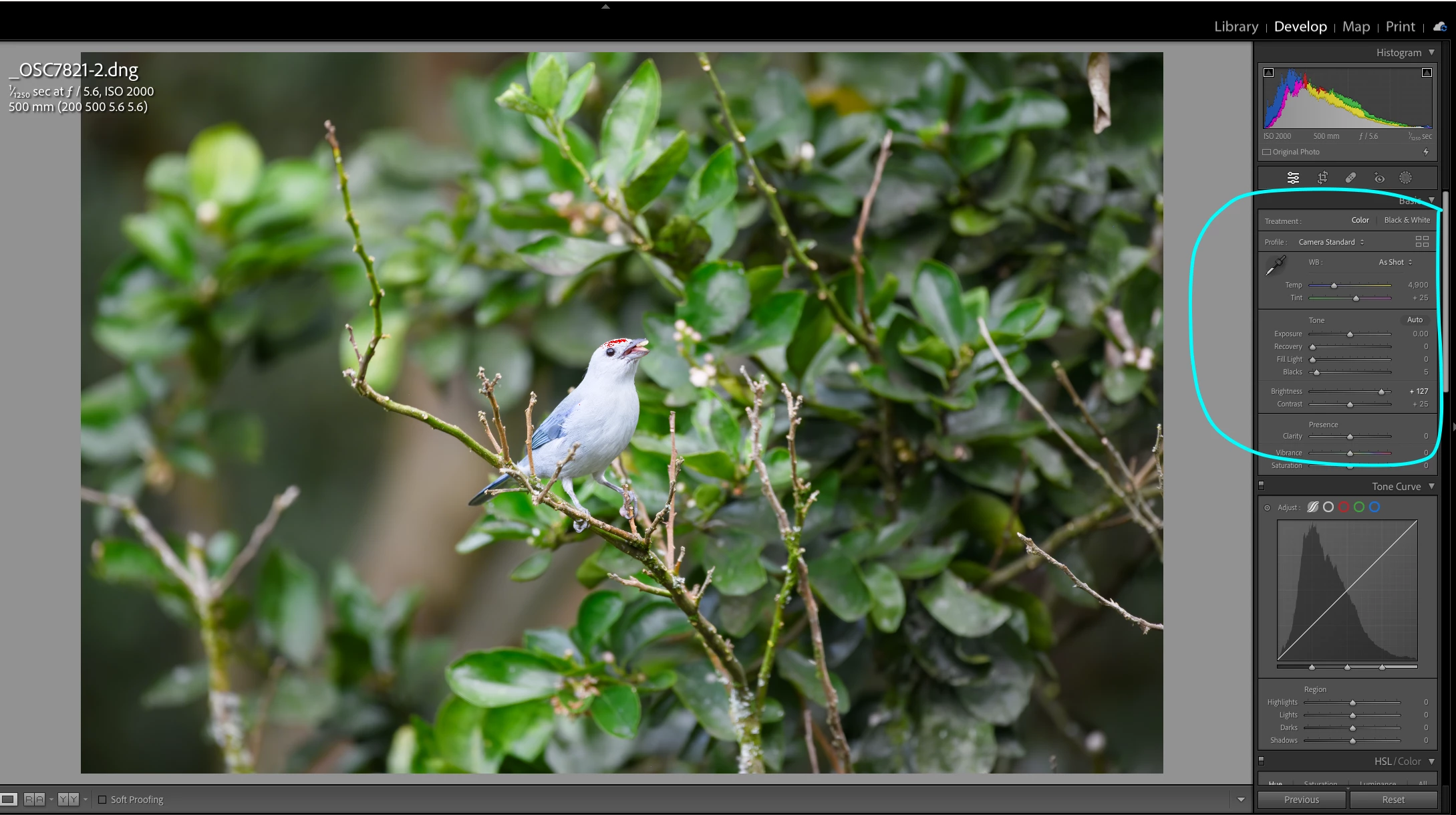
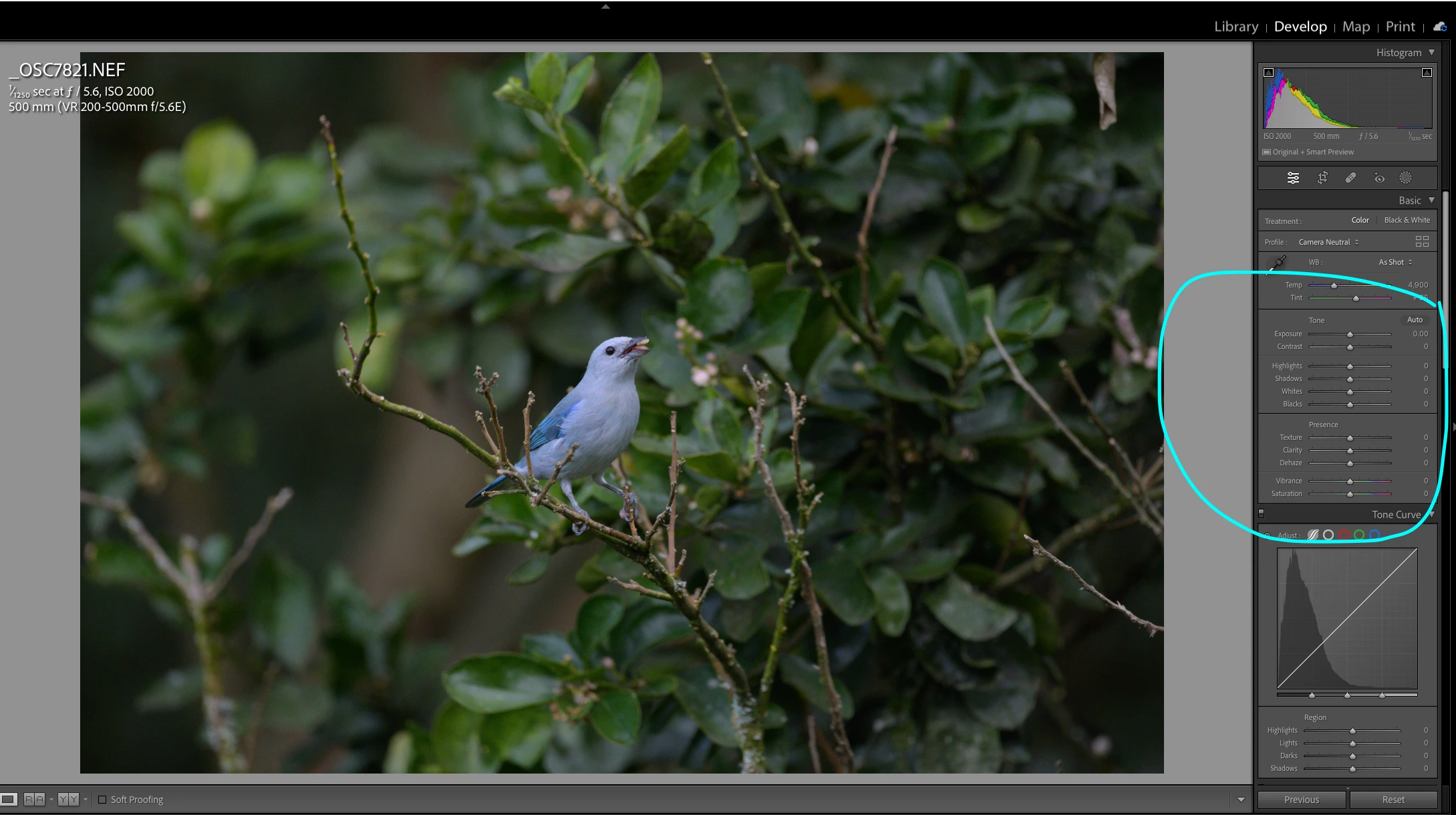
But this week I started noticing that the edition tools or controls I have in the Adjustment Panels / Developing Module of LR Classic are different for a DNG file than for a RAW image. See attached pictures.

FOr example, There is no White, Shadow, Texture tool when I am editing a DNG file (and there is a Recovery and FIll Light controls that are new for me and they don't appear when editing a Raw image).


I am used to edit my photos using the controls/options you see for the RAW image: exposurce, shadows, whites, blacks, but now witih DNG Files I am getting crazy...does someone knows why the edition tools are different


I am using the latest LR classic version (12.1) on a mac
This topic has been closed for replies.
Correct answer Jim Wilde

The DNG is currently set to use a very old LrC Process Version, whereas the NEF is correctly using the current Process Version. You can (should) update the PV for the DNG by clicking on the Lightning icon at the bottom-right corner of the Histogram panel. 


However, you need to find out why that has happened. What process are you using with Topaz to generate the DNG? Have you applied a preset of some description to the DNG after it came back to LrC? And why does the filename have a "-2" at the end, as that tends to suggest the process that creates the DNG has been run twice? Perhaps you can explain your exact workflow so that we can try help you figure out what's happening to cause the old PV to be used.

2 replies

GoldingD
Legend
December 27, 2022

When you sent the image from LrC to Topaz, did you go the route:

File > Plug-in Extras > Process in Topaz Photo AI

or did you go the route:

Photo > Edit in > Topaz Photo AI

Topaz is a bit odd that way, and reccomends the first for RAW source the later for raster.

Or did the Topaz edit/convert occur outside of LrC?

Oscar Mauricio Vargas
Participating Frequently
December 27, 2022

I go the route: File > Plug-in Extras > Process in Topaz Photo AI

I read from Topaz that this option is more efficient than the other way (which creates a tiff file)

Jim Wilde
Community Expert
Community Expert
December 27, 2022

Can you post a screenshot of the LrC Preferences>Presets tab, it would be useful to see what you have specified in the Raw Defaults section.

Jim Wilde
Community Expert
Jim WildeCommunity ExpertCorrect answer
Community Expert
December 27, 2022

The DNG is currently set to use a very old LrC Process Version, whereas the NEF is correctly using the current Process Version. You can (should) update the PV for the DNG by clicking on the Lightning icon at the bottom-right corner of the Histogram panel. 


However, you need to find out why that has happened. What process are you using with Topaz to generate the DNG? Have you applied a preset of some description to the DNG after it came back to LrC? And why does the filename have a "-2" at the end, as that tends to suggest the process that creates the DNG has been run twice? Perhaps you can explain your exact workflow so that we can try help you figure out what's happening to cause the old PV to be used.

Oscar Mauricio Vargas
Participating Frequently
December 27, 2022

Thanks a lot Jim

solved! I updated the process version and now I see the right tools.

Very good questions. I will have to figure out why that is happening, I don't have any preset.. . the -2 name was because I proessed twice the files because of the edition control issue.