
Participant
November 5, 2024
Question

Difficulty finding files on Hard Drive

  • November 5, 2024
  • 2 replies
  • 340 views

I am having a hard time locating my Raws on my hard drive. What I do is import them all on a hard drive, then cull them in Narrative Select, and then export them to Lightroom. After I am done with the photos, I will put them into a folder called 'Done', so I can still keep on Lightroom but for it not to feel cluttered. 


But I just realized I messed up all the locations of my files and I cannot find them on my hard drive and I am not sure where to look for them. Any help would be appreciated. 


This topic has been closed for replies.

2 replies

GoldingD
Legend
November 5, 2024


The Folder structure as LrC is showing. What folder/drive is above that  Done folder? And why

the ? marks.


Participant
November 5, 2024

They are folders I did not put on my hard drive and later moved them after completing the gallery. Just didn't delete the catalog on Lightroom afterwards 


It's basically just the photos I save on my desktop and then move afterwards. I mostly do that with personal work

dj_paige
Legend
November 5, 2024

But I just realized I messed up all the locations of my files and I cannot find them on my hard drive and I am not sure where to look for them. Any help would be appreciated.
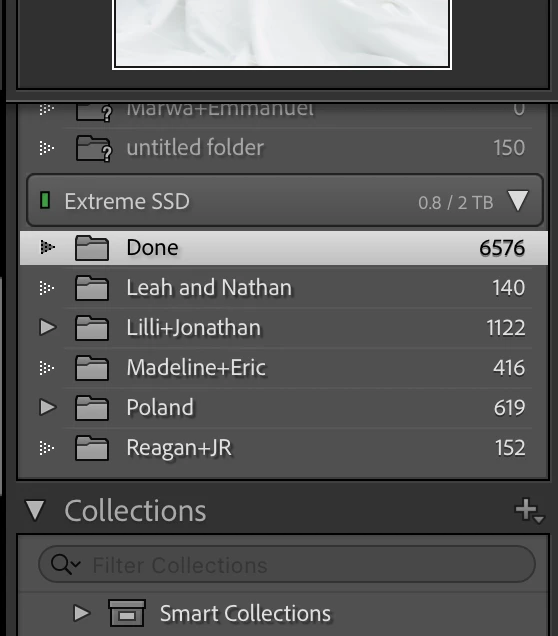
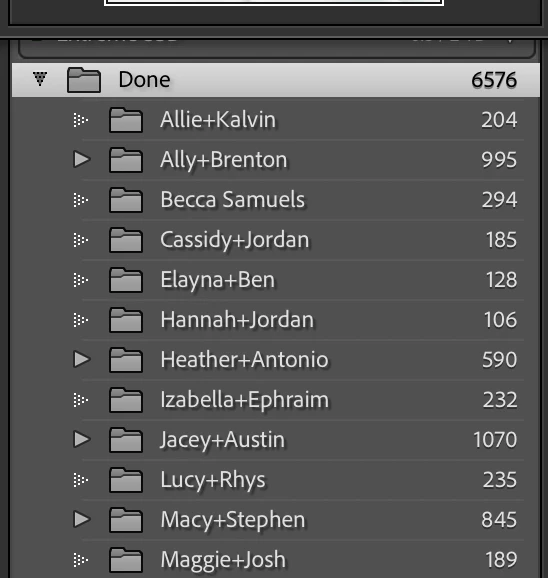
 

Explain this in more detail. What do you see that is "messed up"? Do the photos in the Library Module have exclamation point icons as shown in Figure 2 here?


After I am done with the photos, I will put them into a folder called 'Done', so I can still keep on Lightroom but for it not to feel cluttered.


Explain this in more detail too ... HOW do you put them into a folder called "Done"? Please tell us step-by-step. Are you doing this in LrC, or in Mac Finder?


I strongly suggest you stop using this "Done" folder. To indicate the work is done, leave the photos where they are and assign a Red color label to these photos (or green or blue or whatever you'd like). I also suggest you use keywords instead of these folder names to identify the people in the photos.

Participant
November 5, 2024

I thought it was a good system until I realized all the photos were relocated.


I can still access the files on Lightroom and edit them as needed, but I am trying to find all the Raws from the given gallery, and I can't find them. They are not on my hard drive, and not sure where else to find them.


After I am done with a gallery, I will drag and drop the individual catalog and put it into the 'done' catalog. I did learn my lesson and do not plan on doing this method again but I would love to know where the Raws are right now. If they are trackable.

dj_paige
Legend
November 5, 2024

Please answer my question: Do the photos in the Library Module have exclamation point icons as shown in Figure 2 here?