Inspiring
August 7, 2020
Question

Dividing presets into clusters

  • August 7, 2020
  • 2 replies
  • 3034 views

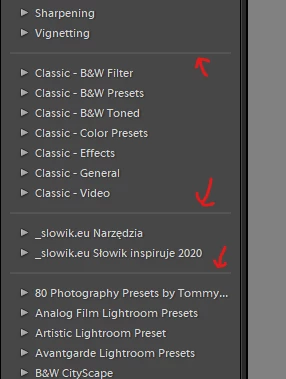
Hello. Do anyone know, how can I divide presets into "clusters". I want to separate some of my presets folders with those lines:

 

2 replies

Community Expert
December 2, 2023

(deleted - the OP's screnshot shows clusters of preset groups, not organising presets between groups. The latter is a simple drag-drop - with new groups easy to add by selecting that option within the Move preset command.)

johnrellis
Legend
August 8, 2020

If you want one or more preset groups to appear in a separate cluster, do the follow steps for every preset in the groups:


1. Right-click the preset and do Show In Finder / Explorer.


2. Edit the selected .xmp file in a text editor, e.g. Text Edit or Notepad.


3. Replace the following line:


crs:Cluster=""


with this:


crs:Cluster="John's Cluster"


[Use the blue reply button under the first post to ensure replies sort properly.]

szerwonyAuthor
Inspiring
August 9, 2020

So if I have for example 400 presets, I need to do this manually to every single preset? That would take a lot of time. Is there no automatic or faster solution for this?

szerwonyAuthor
Inspiring
August 9, 2020

Never mind, I managed to group edit presets with Notepad++