Inspiring
September 24, 2023
Answered

DJI RAW Camera Profiles Have Disappeared

  • September 24, 2023
  • 5 replies
  • 9823 views

Nube, total and absolute. Please...be gentle.


I installed Light Room Classic, marvelled at its power. Played with DJI Air 3 and Mavic 3 panorama shots.


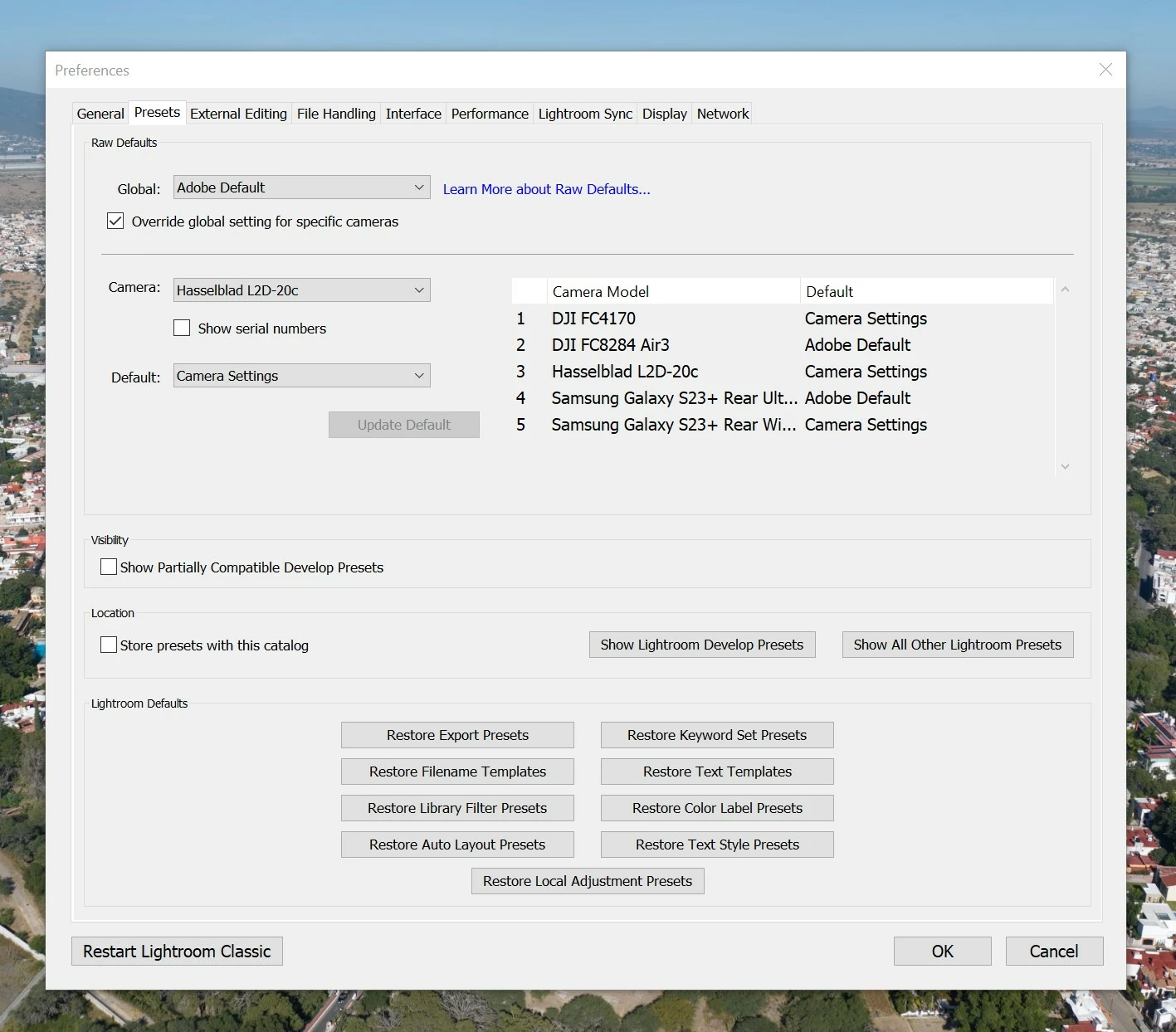
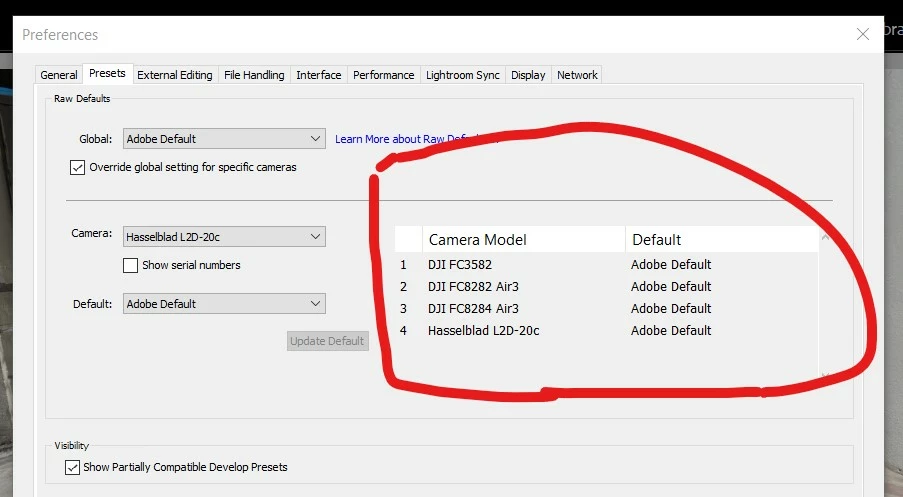
All was fine. Then I changed the default save locations for RAW settings and the gallery. All the profiles have disappeared though they show in the preferences - but - suddenly the Air 3 profile disappeared from that window all of a sudden.


Panoramas no longer work or come up as a 360 degree image on my phone. I presume because they have no lens/camera data to work with.


I only shoot in RAW.


Assistance appreciated.


Windows 10 Pro

7950X

AMD 7900XT

64GB memory.


Correct answer Brendon32145162gusw

"It has camera profiles for Air2S, Mavic 3, And Air 3 that it displays as two different camera serielas for the standard and X3 dual camera."


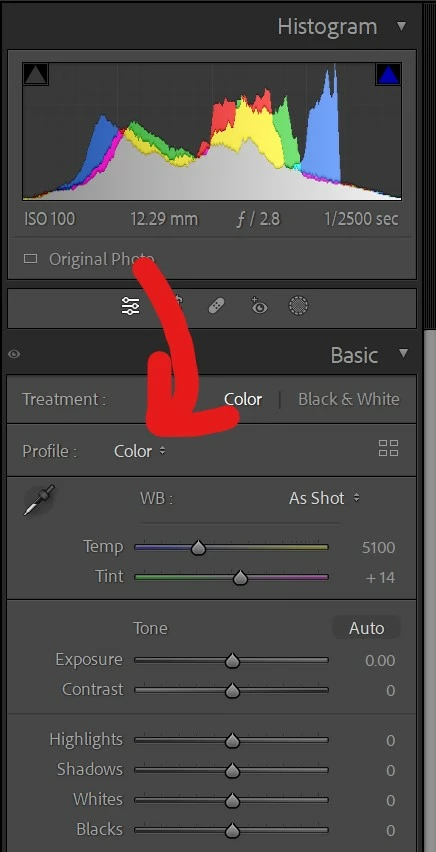
The Default column isn't showing camera profiles -- it's showing what profile and develop settings LR should apply by default for that camera. "Adobe Default" means LR will apply the "Adobe Color" profile if a camera profile for that camera exists, "Color" otherwise.  Since in the case of these cameras, there are no Adobe-provided profiles, it shows "Color" in the Basic panel's Profile dropdown.


See here for more explanation about how Raw Defaults work:

https://helpx.adobe.com/lightroom-classic/help/raw-defaults.html


Just to confirm and consider this issue, "not an issue" anymore...this is the correst setting...


It then shows up as "Colour". The standard setting for the camera?


If correct, there was never a problem. But I would have sworn on a stack of Playboys that the specific DJI camera setting was showing on the "profile" heading. I am confused still, (memory confused), but feel my question on the specifics of Camera Profile ***and lens*** has been answered.


Thanks everyone for assiting.


However, the panorama's are not showing up correctly in my Samsung S23 Plus state approvved tracking device. 360 degree panoramas have this marking...


I will make that a seperate post later, when I have gone over all the settings on the drones.


Agaon, many thanks for the assistance. 

5 replies

Participating Frequently
February 15, 2024

A similar problem is occurring in my environment.
When developing DNG taken with DJI AIR3 (wide-angle lens), "Profile missing" is displayed and only color and monochrome can be selected.

1
I had the same issue before, but it was resolved by updating LR.

2 
Even files taken with the same AIR3 (same lens) that were taken before a certain point are working properly.
Probably only the ones taken after updating the AIR3 firmware can't find the profile.

I'll attach an image with information about the two files, one that works and one that doesn't.
Notice that only the software versions are different.

My guess is that Adobe doesn't support DJI's firmware updates. In that case, updating LR may resolve the issue.
My LR is currently up to date.
If you have any other solutions or information, please let me know.

I posted the following post in Japanese.


https://community.adobe.com/t5/lightroom-classic%E3%83%95%E3%82%A9%E3%83%BC%E3%83%A9%E3%83%A0-discussions/%E3%83%97%E3%83%AD%E3%83%95%E3%82%A1%E3%82%A4%E3%83%AB%E3%81%8C%E8%A6%8B%E3%81%A4%E3%81%8B%E3%82%8A%E3%81%BE%E3%81%9B%E3%82%93-dji%E3%83%89%E3%83%AD%E3%83%BC%E3%83%B3%E3%81%A7%E3%81%82%E3%82%8B%E6%99%82%E6%9C%9F%E4%BB%A5%E9%99%8D%E3%81%AB%E6%92%AE%E5%BD%B1%E3%81%97%E3%81%9Fdng%E3%83%95%E3%82%A1%E3%82%A4%E3%83%AB%E3%81%AE%E3%81%BF/m-p/14421759?profile.language=ja#M7702

Ian Lyons
Community Expert
Community Expert
February 15, 2024

As you've indicated, the firmware update may be the underlying reason for the DNG files no longer beingreadable. That being said, it would be helpful if you could provide one of the DNG files captured when using the new firmware. Uploading to Dropbox or similar and providing link is the best option for this. 

Participating Frequently
February 15, 2024

Thank you for your reply.
I have uploaded two files to dropbox.
Both photos were taken with the same DJI AIR3 wide-angle lens, the only difference being the software version.
The "works" file works as expected, but the "not works" file shows "profile missing".


works

https://www.dropbox.com/scl/fi/4e3dgl8p5s66a9lk3lv4l/works_DJI_20231210105602_0005_D.DNG?rlkey=22xdldkjdmrbxb0i0ag0vo982&dl=0


not works

https://www.dropbox.com/scl/fi/is3vqeiyatkfe0m73or87/not_works_DJI_20240101111934_0001_D.DNG?rlkey=olocbbemz6vzg8l32yqsqosg2&dl=0

johnrellis
Genius
September 24, 2023

Let's start with the basics. There are two different kinds of profiles: camera profiles and lens profiles.


Camera profiles tell LR how to convert raw sensor data into a visually pleasing image. You select a profile in the Profile dropdown in the Basic panel.


Adobe provides camera profiles for only a few of the DJI cameras, which don't include the Air 3 or Mavic 3:

https://helpx.adobe.com/camera-raw/kb/camera-raw-plug-supported-cameras.html#DJI


But since DJI uses the industry-standard DNG format for its raws, LR knows how to interpret them anyway, without a camera-specific profile.  For such DNGs, the profile will always show as "Color" in the Basic panel (as seen in your screenshots).


Lens profiles tell LR how to apply corrections for particular lenses.  Adobe provides lens profiles for some of the Phantom lenses used with DJI cameras but not most:

https://helpx.adobe.com/camera-raw/kb/supported-lenses.html#Phantom


None of the lenses used with the Air 3 (camera model FC8284) or the Mavic 3 Pro (L2D-20C) are listed.


Inspiring
September 24, 2023

Manythanks for reply. They have camera profiles for Air2S, Mavic 3, And Air 3 that it displays as two different camera serielas for the standard and X3 dual camera.


 The "lens" comes up as Hasselblad when I do the panoramas. They come out perfectly and my S23 Plus registers the panorama as a 360 degree panorama.


Neither does my laptop with Light Room work either.


All settings on my laptop have remained untouched and I have only now gone online with it after a week or so.


This is extremely frustrating.


JohanElzenga
Community Expert
Community Expert
September 24, 2023

I'm not sure if that applies to all DJI drones, but Lightroom Classic does not have and never had camera or lens profiles for my Mavic Air 2 or my Mini 3 Pro.


-- Johan W. Elzenga
Inspiring
September 24, 2023

It has camera profiles for Air2S, Mavic 3, And Air 3 that it displays as two different camera serielas for the standard and X3 dual camera.


johnrellis
Genius
September 24, 2023

"It has camera profiles for Air2S, Mavic 3, And Air 3 that it displays as two different camera serielas for the standard and X3 dual camera."


The Default column isn't showing camera profiles -- it's showing what profile and develop settings LR should apply by default for that camera. "Adobe Default" means LR will apply the "Adobe Color" profile if a camera profile for that camera exists, "Color" otherwise.  Since in the case of these cameras, there are no Adobe-provided profiles, it shows "Color" in the Basic panel's Profile dropdown.


See here for more explanation about how Raw Defaults work:

https://helpx.adobe.com/lightroom-classic/help/raw-defaults.html

GoldingD
Legend
September 24, 2023

In your first screen capture. Yes I know the sensor might actually be a Hasselbald, and your specific DJI might not be listed as DJI, hence Hasselblad. BUT change it to Adobe Default and see what occurs. (might need to import)


Inspiring
September 24, 2023

Its the same. Nothing changes. 🙂 I forgot to add that Adobe cannot access the internet. Says continually it has no access when it clearly has full and total access through the firewall. Again, just astarted. Same time no profiles, no recognition on Panoramas the image is a panorama etc.

I have tried every combo I can think of. The ONLY variable was I changed defalt file and profile and general save locations.


Inspiring
September 24, 2023

The panorama information window clearly states it cannot apply the appropriate lens correction.

Inspiring
September 24, 2023

Apolagies for posting mess - here is the profile - empty. Just Adobe.


GoldingD
Legend
September 24, 2023

That last screen capture, implies that a JPEG or other non RAW image is selected.