
Participant
June 29, 2024
Question

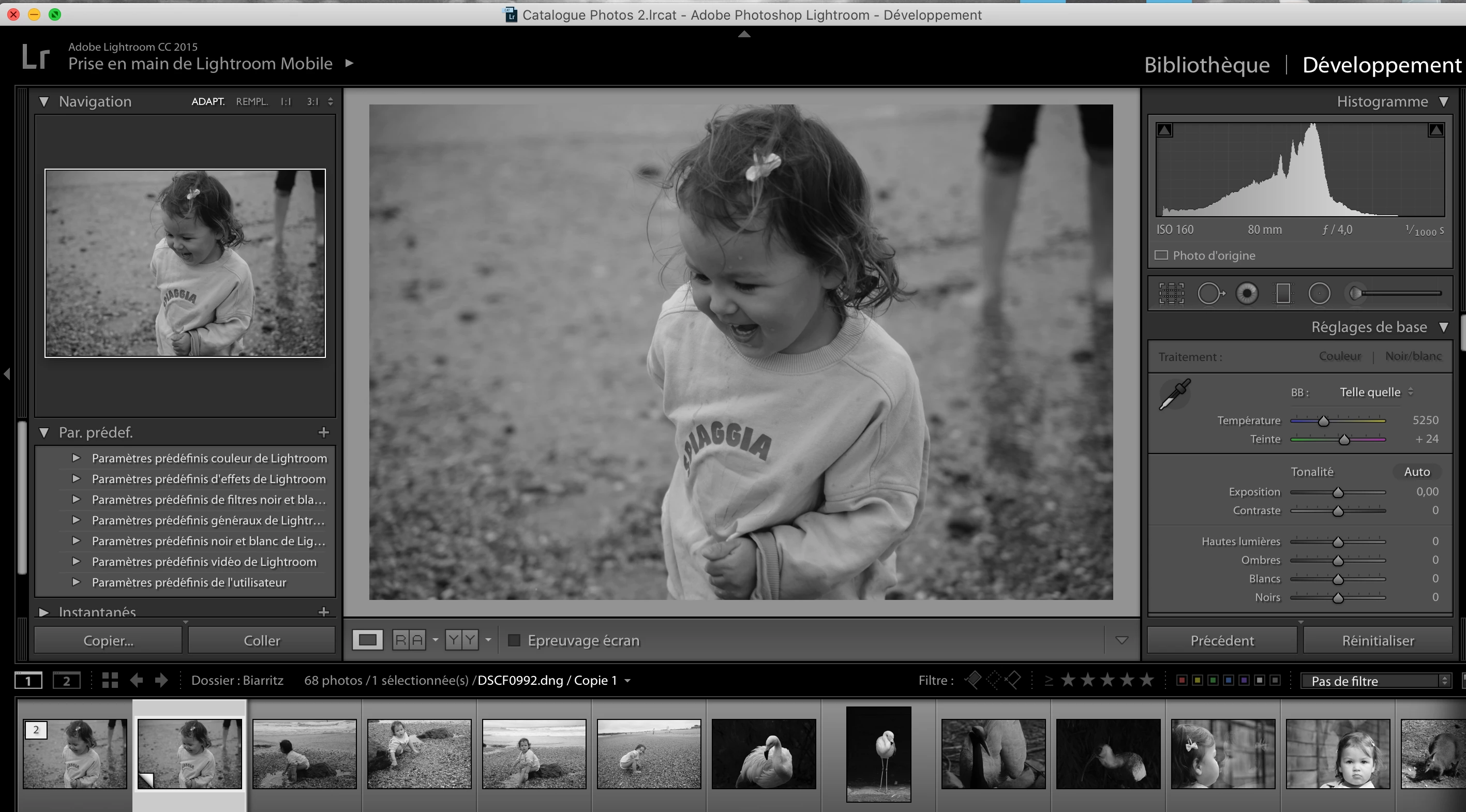
DNG transformés automatiquement en noir et blanc dans LR

  • June 29, 2024
  • 3 replies
  • 369 views

Bonjour

Je dispose d' Adobe Lightroom, version [1149743] avec Camera Raw 10.1

J'ai fais l'aquisition d'un fujifilm X-S10 qui produit des fichiers RAF

Je les transfert en DNG pour pouvoit les ouvrir dans Lightroom (ce qui fonctionne toujours bien avec d'autres appareils)

Ils se transforment alors en Noir et blanc automatiquement et ce que dans lightroom. Ils gardent leurs propriétés couleurs dans un autre dérawtiseur.

Je souhaiterai résoudre ce problème car toutes mes photos sons classées dans LR

Par avance merci,

Cordialement

Ci joint une capture de l'écran LR que j'obtiens
 

[moved from bugs to discussions according to the community rules - Mod.]

This topic has been closed for replies.

3 replies

laurentc73844495
Participant
July 11, 2024

bonjour

J'ai galéré la dessus toute la journée : fichiers RAF du Fuji GFX 50S ii , passés par DNG Converter, puis un vieux Lightroom (4.4)

Il faut dans DNG Converter : "3) Sélectionner le nom des images converties" / "extension de fichiers" : taper .DNG (et pas .dng)

C'est tout bête mais ça m'a bouffé l'après-midi...

Laurent

GoldingD
Legend
June 29, 2024

First up. I notice that your copy of Lr is extremely old


I find it hard to remember if that is a Perpetual version, or the earliest subscription version. Is this something like v6.14?


 transfer them to DNG so I can open them in Lightroom


and


I bought a fujifilm X-S10 that produces RAF files


so since that camera is not supported in the old perpetual Lr v6.14 or older.


source:


I assume that you are using a third party RAF to DNG converter, such as Iridient X-Transformer??


Two issues come to mind.

1. First up, in your RAF to DNG converter, any settings wrong?

2. I notice that your Treatment is shown as neither Color, or Black&White. Now that may be the way old v6.14 was, hard to remember. But is that correct, Is something wrong with your preference file? (The file, not the preferences settings)


That all being sais, an additional inquiry as follows


In your screenshot the History panel is not shown, can you post in a reply a new screenshot including the History panel?


Participant
June 30, 2024

Bonjour

Merci pour votre réponse

Il s’agit d’une version perpétuelle. Je dispose d' Adobe Lightroom, version [1149743]

J’utilise DNG converter. J’ai tenté différents réglages dans les préférences sans succès.

Je n’ai jamais eu de problèmes avec des fichiers convertis en DNG provenants d’autre appareils photos

Cordialement


Good morning
thank you for your reply
This is a perpetual version. I have Adobe Lightroom, version [1149743]
I use DNG converter. I tried different settings in the preferences without success.
I have never had any problems with files converted to DNG from other cameras
Sincerely

dj_paige
Legend
June 30, 2024

This is a perpetual version. I have Adobe Lightroom, version [1149743]


Lightroom perpetual versions are 1 2 3 4 5 or 6, usually with a decimal such as 6.9 or 5.7. Go to Help->System Info and show us the top 10 lines. Anyway, both @GoldingD and I have asked for additional information, that you have not provided yet. It would be extremely helpful if you provided that information.

dj_paige
Legend
June 29, 2024

Can you share one of these DNG and the related original RAW file on Dropbox or similar, and provide us with the link, so we can see if the same thing happens with our version of Lightroom Classic.