
Inspiring
September 30, 2018
Answered

DNG versus dng files; 26 Mb versus 58 Mb, why, how?

  • September 30, 2018
  • 3 replies
  • 1686 views

I recently dowloaded  a day's set of 125 images, with my standard presets as DNG files on my pc. Something happened and about half of the files were downloaded only as arw files. I wanted to change them to DNG inside Lightroom and clicked on this and that and got them to be made into dng (lower case) files. I adjusted them as I usually do and now 70 of these files are each taking up 58 - 54 Mb instead of the usual 26 about Mb.

How did this happen, what can be done to revert them to smaller DNG files; my sensor has only 24 Mb .

I know I should have deleted these wayward unconverted files immediately and reloaded them with the standard  upload conversion to DNG.

I could still do that now from the memory card, but then I would lose all my work of adjusting.

Maybe I just have to live with this waste of memory space. Can anyone help me?
This topic has been closed for replies.
Correct answer Rob_Cullen

I wanted to change them to DNG inside Lightroom

Make a check of the dialog to Convert the ARW files to DNG.

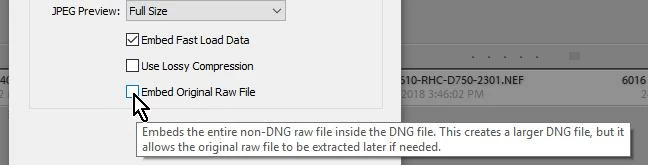
There is an option to embed the original ARW within the DNG and so doubling the size.

This option should be un-checked.

If, in fact, you DID embed the original ARW, there is a way to correct, but it takes a few steps and you should make backups of the photo files and Catalog in another location before you do the fix.

This would involve using the free Adobe DNG Converter to extract the embedded ARWs and then re-convert them to DNG without the 'Embed' option.

Ask for details if you do not understand how to use Adobe DNG Converter for this, and the method that will preserve your catalog data.

3 replies

Just Shoot Me
Legend
September 30, 2018

I am confused by your post and that you state that some Sony ARW files were converted to DNG and some weren't. This, as far as I know, Can't happen. In the import dialog window if you select to Copy As DNG then all images copied off a cameras memory card will be converted to DNG files as they are placed on the hard drive where they will be stored, Not just some of them.

The only time this could possibly happen is if you did 2 different imports off the same card and on 1 you had selected Copy As DNG and the other you selected just Copy.

Inspiring
September 30, 2018

This can't happen you say, but it did.

I think that I am the culprit here. Why? I may have moved the  file into which the uploads go with my "by date" settings into the corresponding 'month' folder before the upload process was completed.

I did get a message that file number 0071 could not be found; I clicked ok and it was missing inside the uploaded day file at the end. From file number 72 till the end everything was uploaded but just in ARW. These ARWs I then converted to DNG through the LR dialog box and they all became huge files beyond file number 71.  So it can happen. I was careless and rushing LR, trying to upload at the same time from a second camera as well.

JohanElzenga
Community Expert
Community Expert
September 30, 2018

Just a note: lowercase ‘dng’ or uppercase ‘DNG’ has nothing to do with this. They are the same, the difference is only cosmetic. That applies to all file extensions (jpeg, JPEG, tiff, TIFF, docx, DOCX).

-- Johan W. Elzenga
Inspiring
September 30, 2018

That the letter sizes for 'dng' do not matter is not quite right: I noticed (upon cleaning out large files from my laptop) that suddenly yesterday I had dng files of huge sizes near the top of my file size list.

I looked these images up inside LR in grid view and the large 58 Mb versions were all with lower case dng names above the thumbnails while the 25 Mb size ones were listed as upper case DNG in grid view. So somehow LR knows something here.

If I look into "Finder" on that MAC laptop, everything appears with a lower case extension of dng or an  upper case DNG there as in grid view.

Just Shoot Me
Legend
September 30, 2018

uhligfd=me  wrote

That the letter sizes for 'dng' do not matter is not quite right:

The File Extension letter size, lower case dng or capital (Upper Case) DNG, has no barring on the data that is In the file or how it is displayed in any program that can display that file on screen.

Rob_Cullen
Community Expert
Rob_CullenCommunity ExpertCorrect answer
Community Expert
September 30, 2018

I wanted to change them to DNG inside Lightroom

Make a check of the dialog to Convert the ARW files to DNG.

There is an option to embed the original ARW within the DNG and so doubling the size.

This option should be un-checked.

If, in fact, you DID embed the original ARW, there is a way to correct, but it takes a few steps and you should make backups of the photo files and Catalog in another location before you do the fix.

This would involve using the free Adobe DNG Converter to extract the embedded ARWs and then re-convert them to DNG without the 'Embed' option.

Ask for details if you do not understand how to use Adobe DNG Converter for this, and the method that will preserve your catalog data.

Regards. My System: Windows-11, Lightroom-Classic 15.3, Photoshop 27.5, ACR 18.3, Lightroom 9.3, Lr-iOS 10.4.0, Bridge 16.0.3 .