
Participant
June 13, 2024
Question

DO NOT ENABLE generative remove tool it has corrupted preview generation, editing is impossible

  • June 13, 2024
  • 2 replies
  • 343 views

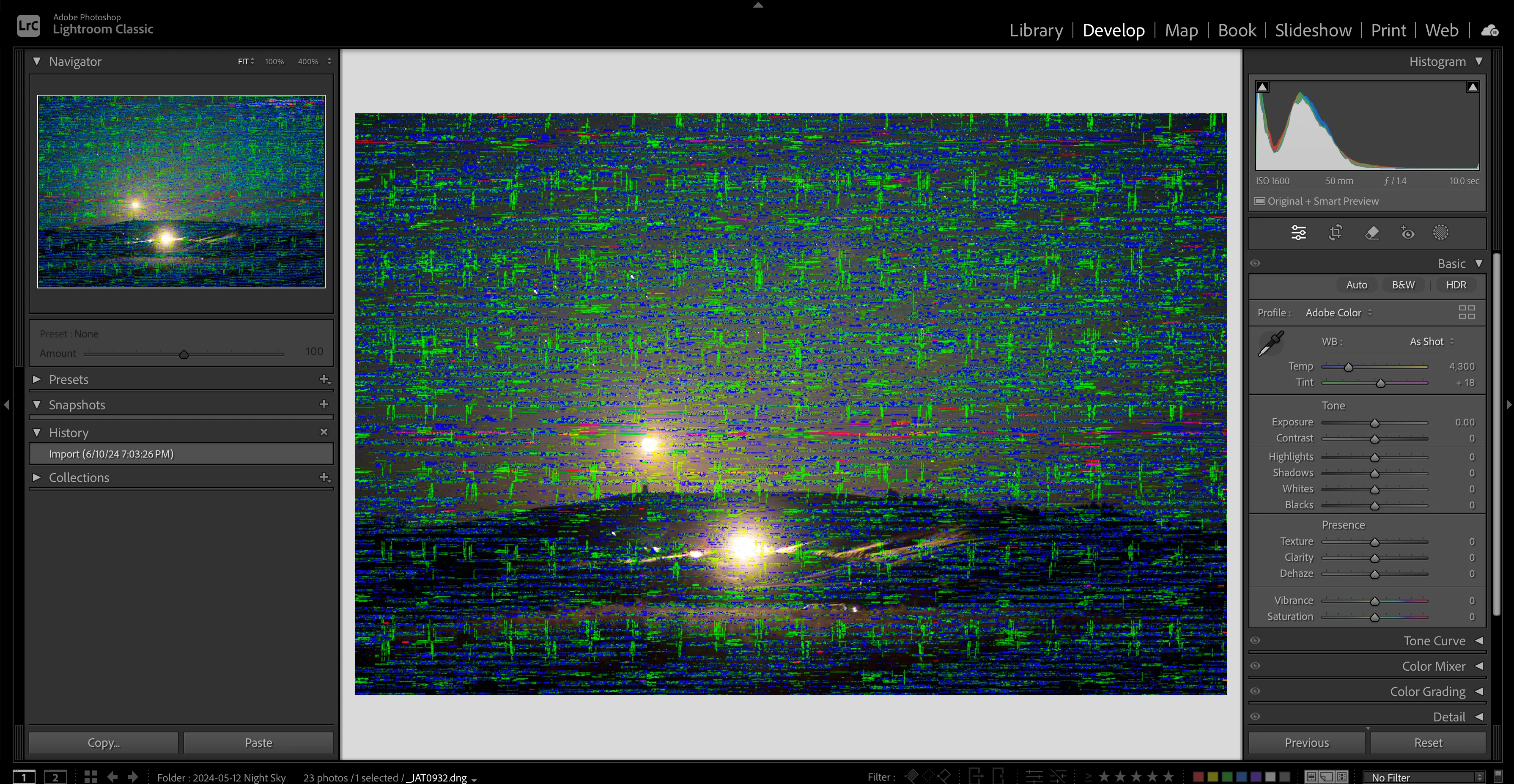
I have included a screenshot, this is an unedited image that was downloaded last week. Everything worked normally until I clicked to enable the generative remove tool on another file. I have restarted my computer and LR. Everytime I use LR now it rebuilds all working preview images like this. It is now impossible to complete my tasks for the day.
This topic has been closed for replies.

2 replies

Ian Lyons
Community Expert
Community Expert
June 13, 2024
johnrellis
Legend
June 13, 2024

Agree with Ian -- it looks the issues others have with some AMD GPUs. Please do the LR menu command Help > System Info and copy/paste the entire contents here so we can see exactly which versions of hardware and software LR thinks you're running.

JohanElzenga
Community Expert
Community Expert
June 13, 2024

I find it very hard to believe that the Generative Remove tool caused this. I think this is caused by something else, and using that tool was just a coincidence. This looks like a GPU issue, so please state the exact details of your computer and the version of MacOS. You also may want to go to Preferences - Performance and switch off the use of the GPU to see if that fixes it.


-- Johan W. Elzenga