Thank you Conrad .... as usual. But it's nearly impossible to adjust these images as thoptions in Quick Develop are super minimal. So I am not sure how useful that feature is when it's alll said and done.
Also the GH5 II is a rather complex camera and I was always surprised Panasonic doesn't offer workshops to teach clients how to best use their equipment. Tutorials on line are ... not satisfying and full of hype.
Thanks a lot for responding 🙂
Well, I got more curious and pulled out the manual for my camera, just to understand what did end up in Lightroom Classic.
Post Focus does actually save videos. After you press the shutter, the manual says “a motion picture in MP4 format will be recorded. (Audio will not be recorded).” You don’t get a still until you play back the Post Focus video in the camera and press a button to export a still from the video. That answers the question of why they all imported as videos into Lightroom Classic.
From this point, to edit them as photos in Lightroom Classic, you could do the following:
1. In the Library module, view one of the videos in Loupe view so you can see the video playback controls, and move the time to the frame you would like to keep as the still image.
2. Choose Capture Frame from the video playback bar. This extracts one frame from the video and saves it in JPEG format. In the catalog, the new image is listed in the same folder as the video it came from.
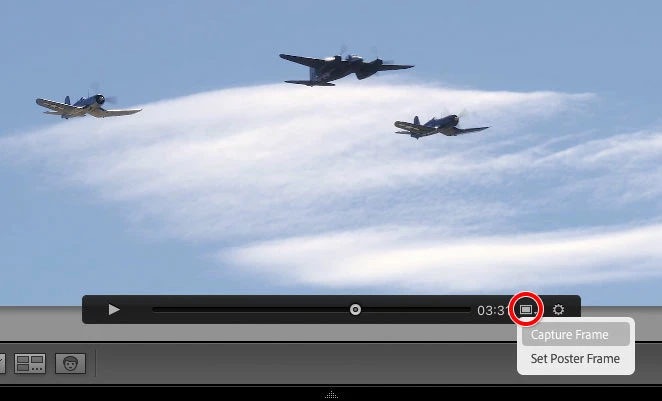
3. After you extract a JPEG image from each video, you can filter the Library view to show just videos and then delete them all, leaving only the JPEG images you extracted from them. Now that you have JPEG stills, you can edit them in the Develop module.
On my camera, Post Focus is one of the dial settings, so all it takes to accidentally shoot that way is for the dial to get bumped. This is like one of those cases where I forget to pay attention to the dial setting before shooting, and end up shooting JPEGs in Scene or Full Auto mode instead of raw files in P, A, S, or M.

 AdChoices