I was told that “when an image is opened in LRC, sometimes Adobe automatically creates a mask” and I want to know if that is correct and if so how do I detect or search for these auto created masks?
Correct answer Conrad_C
This subject can get pretty deep. No masks are created by the Adobe default settings, so a fresh install of Lightroom Classic should not create any masks. However, you can make an import preset that does create masks for every imported file, if you want. At a basic level, if an image has a mask, you’ll see it in the Masks panel.
Do you know any way to search for images that DO have a mask of some type?
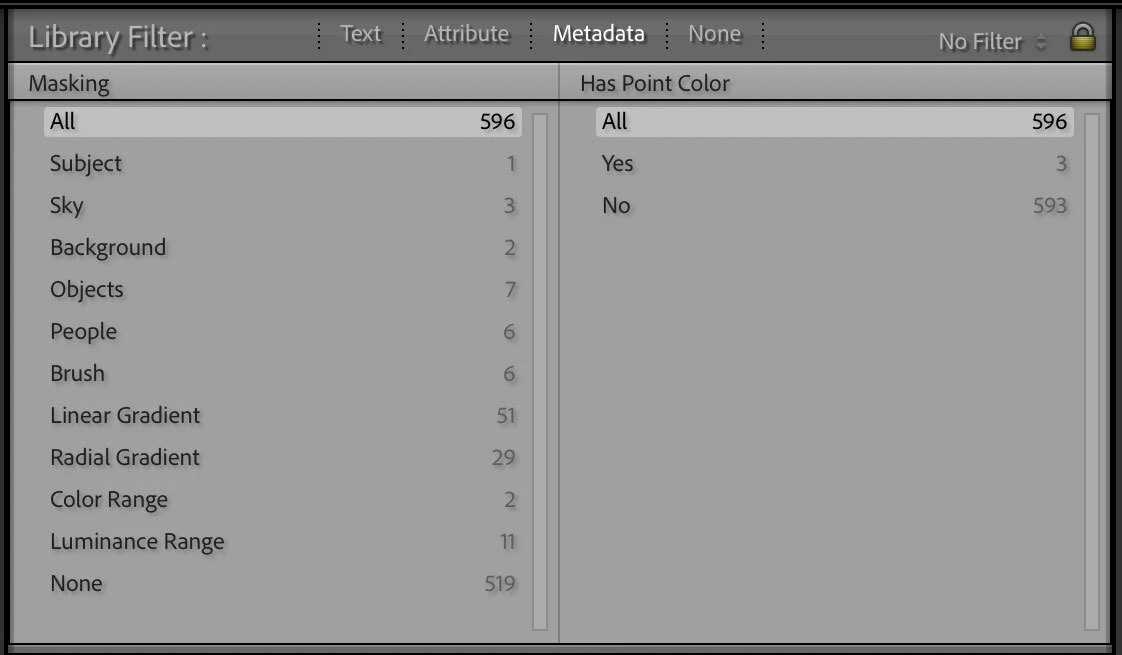
One way is using the Library module filter bar. If you set up a Metadata filter, the Develop category has a Masking sub-category, as shown in the picture below. Naturally, that can be combined with other Metadata filters depending on what you are looking for.
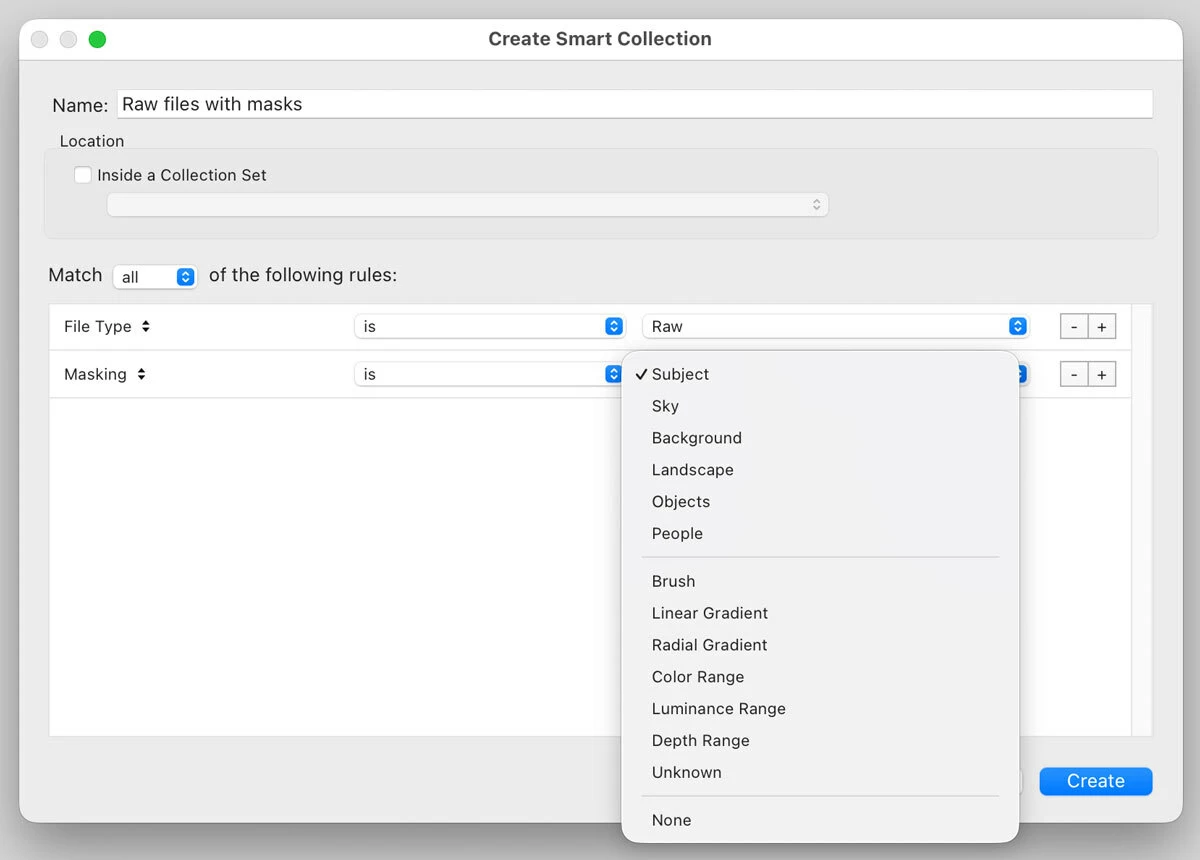
Another way is to set up a Smart Collection that lists images with masks, if that works better. If you’re looking for images with any mask, I suppose you could set it to “Masking” “is not” “None”.
I said at the beginning that this can get deep. What I mean is there are some features that automatically create masks that are not exposed to us users. Maybe that is what they meant. An early example of this is the automatic mask created by adaptive features such as the Shadows option in the Basic panel. That hidden mask helps restrict the Shadows adjustment to the darker tones so that lighter tones aren’t compromised, which solves a problem affecting simpler adjustments such as the Tone Curve.
Another example is the Masking option for Sharpening. But that’s a mask you can see, when you hold down the Option key (macOS) or Alt key (Windows) as you drag the Masking slider.
The most recent, and possibly most advanced, version of this are the hidden masks created when you use an Adobe Adaptive profile. This is a big reason why the Adaptive profiles can greatly reduce the need to create manual masks, at least for me. As Adobe describes in their blog article The Adobe Adaptive Profile:
As mentioned earlier, there are actually three RGBTs in the current version of Adobe Adaptive — a global one that affects the entire image, one that is constrained to operate within the main subject if there is one, and one for the sky. The latter two have associated masks, which are approximate and not exposed to the user. If you create a subject or sky mask manually in Camera Raw using AI masking or manual brushing, you can make further adjustments of the sky and subject, and you can see those masks, but they are different from the masks used inside the Adobe Adaptive profile.
So yeah, there are multiple ways that an image in Lightroom can have standard user-created masks or hidden auto-created masks, depending on which features you’ve applied. But again, none of these masks are created right away by the Adobe default import settings. Even the automatic masks aren’t created until you apply a feature that creates them.
If you suspect LrC has created a mask without you requesting it, please go to the History Panel and confirm that no mask was ever created by steps in the History Panel. But also, in the History Panel, if a preset is applied, you need to examine that preset to be sure there are no masks contained in that preset. Finally, if you copy the edits from another photo or read in .xmp files, that could also cause a mask to appear, so if those steps are in the History Panel you again need to do further research.
As far as I know, Lightroom Classic doesn't automatically create masks just by opening an image. AI-powered masks (like Subject, Sky, or Background) are only generated when you use the Masking tool or apply a preset that includes masking adjustments. If you suspect a mask already exists, open the Masking panel—any existing masks will be listed there. If the panel is empty, no masks have been created.
No, Lightroom does not create masks all by itself. Perhaps the confusion is caused by the Adaptive Profile. If you use the Adaptive Profile, then an invisible mask is created by that profile.
This subject can get pretty deep. No masks are created by the Adobe default settings, so a fresh install of Lightroom Classic should not create any masks. However, you can make an import preset that does create masks for every imported file, if you want. At a basic level, if an image has a mask, you’ll see it in the Masks panel.
Do you know any way to search for images that DO have a mask of some type?
One way is using the Library module filter bar. If you set up a Metadata filter, the Develop category has a Masking sub-category, as shown in the picture below. Naturally, that can be combined with other Metadata filters depending on what you are looking for.
Another way is to set up a Smart Collection that lists images with masks, if that works better. If you’re looking for images with any mask, I suppose you could set it to “Masking” “is not” “None”.
I said at the beginning that this can get deep. What I mean is there are some features that automatically create masks that are not exposed to us users. Maybe that is what they meant. An early example of this is the automatic mask created by adaptive features such as the Shadows option in the Basic panel. That hidden mask helps restrict the Shadows adjustment to the darker tones so that lighter tones aren’t compromised, which solves a problem affecting simpler adjustments such as the Tone Curve.
Another example is the Masking option for Sharpening. But that’s a mask you can see, when you hold down the Option key (macOS) or Alt key (Windows) as you drag the Masking slider.
The most recent, and possibly most advanced, version of this are the hidden masks created when you use an Adobe Adaptive profile. This is a big reason why the Adaptive profiles can greatly reduce the need to create manual masks, at least for me. As Adobe describes in their blog article The Adobe Adaptive Profile:
As mentioned earlier, there are actually three RGBTs in the current version of Adobe Adaptive — a global one that affects the entire image, one that is constrained to operate within the main subject if there is one, and one for the sky. The latter two have associated masks, which are approximate and not exposed to the user. If you create a subject or sky mask manually in Camera Raw using AI masking or manual brushing, you can make further adjustments of the sky and subject, and you can see those masks, but they are different from the masks used inside the Adobe Adaptive profile.
So yeah, there are multiple ways that an image in Lightroom can have standard user-created masks or hidden auto-created masks, depending on which features you’ve applied. But again, none of these masks are created right away by the Adobe default import settings. Even the automatic masks aren’t created until you apply a feature that creates them.
Hi, @JRP27, well, there is ONE way that I’ve accidentally caused. If you have more than one image selected (and forget to turn of AutoSync), and you go to one of the images and create a mask, LRC will try to duplicate that mask on all the others.
If you created a human mask on the primary image, and there is not a human on another image, it will show a failed mask created. But, if there is a human on another image, it will create the mask for that person as well.



 AdChoices