Participant
December 5, 2017
Answered

Don't want images to automatically open in PS

  • December 5, 2017
  • 1 reply
  • 235 views

Disclaimer:  I am not very tech savvy, so I will need step-by-step help.  Thank you!

When I export photos out of LR, PS automatically launches and opens all the images.  How do I prevent this?  When I talked to someone from Adobe about a few issues yesterday, this was one of them.  He said to Right Click on a JPEG image>Get Info>by Default, change setting.  I must have missed a direction or failed to understand what he was saying, because I wasn't able to make the change.  I would appreciate any advice.  Thank you.
    This topic has been closed for replies.
    Correct answer DdeGannes

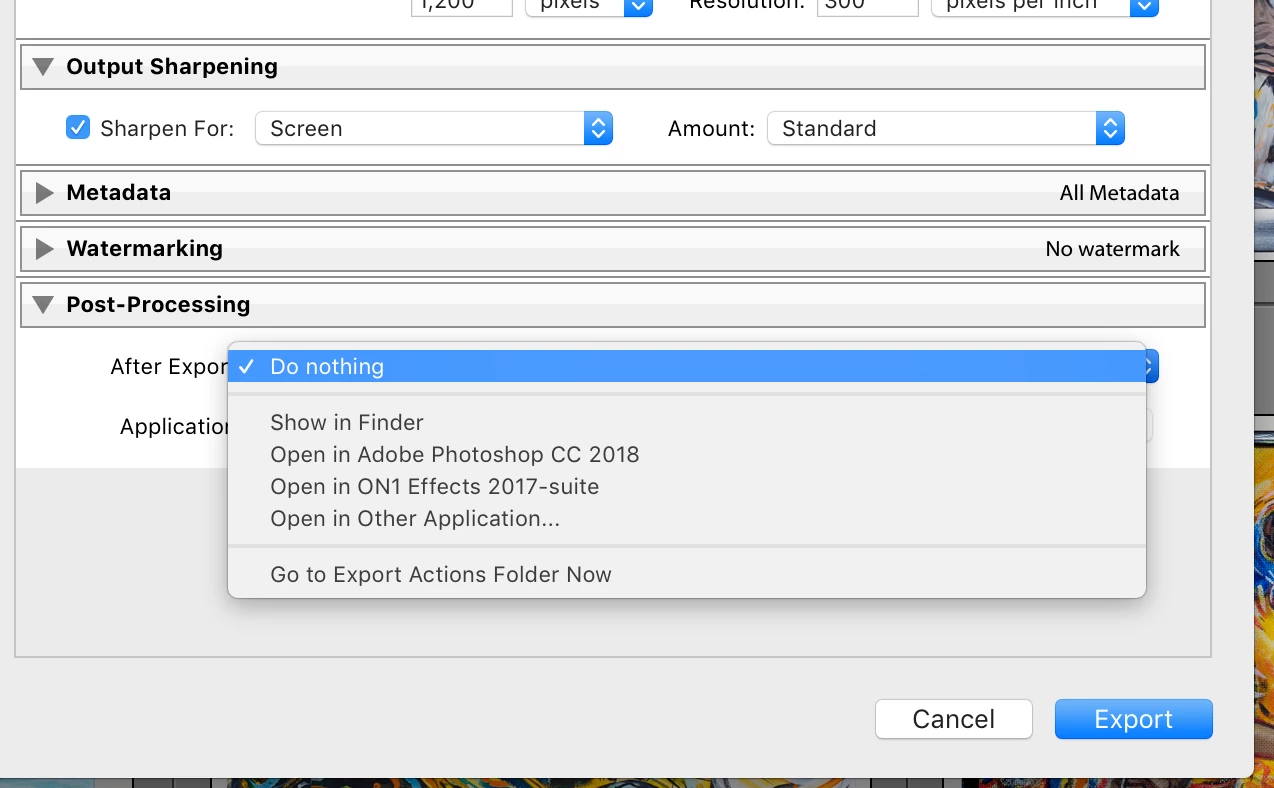
    The screen capture is from the Lightroom export dialog. You can control what happens under Post - Processing it is the last option in the dialog box.

    1 reply

    DdeGannes
    Community Expert
    DdeGannesCommunity ExpertCorrect answer
    Community Expert
    December 5, 2017

    The screen capture is from the Lightroom export dialog. You can control what happens under Post - Processing it is the last option in the dialog box.

    Regards, Denis: iMac 27” mid-2015, macOS 11.7.10 Big Sur; 2TB SSD, 24 GB Ram, GPU 2 GB; LrC 12.5,; Lr 6.5, PS 24.7,; ACR 15.5,; (also Laptop Win 11, ver 24H2, LrC 15.3; PS 27.0; ) Camera Oly OM-D E-M1.
    smithloAuthor
    Participant
    December 5, 2017

    Thank you so much for taking the time to answer my question!  Have a wonderful day!