Participating Frequently
January 27, 2019
Answered

Duplicate xmp files for one RAW image

  • January 27, 2019
  • 1 reply
  • 1449 views

Hi to the gurus of Lightroom

I have a dilemma, in that I find that LR is creating two xmp files for the same CR2 file.

one is .xmp and the other is .XMP. Yes case sensitive.

The images are stored on a NAS and there are two MAC laptops reading the NAS. However when the images are first imported via either laptop the sidecar file is lowercase. However after edits the file changes to Uppercase. The images are not edited at the same time nor saved at the same time. I have even had one laptop without power so that the catalogue is not open. However LR will save a new Sidecar file with uppercase.

I can see the two .xmp files in the Grid view via the Metadata. I am looking for ideas as to why this is happening and thus ways of stopping it.
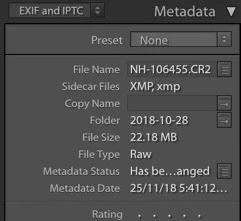
This topic has been closed for replies.
Correct answer johnrellis

It may be that some parts of LR use the lower-case extension "xmp" and some the upper-case extension "XMP".  Though officially LR should work with photos stored on case-sensitive volumes, it has other bugs with that (e.g. with the case of folder names).  So it wouldn't surprise me if LR uses the two different cases of "xmp".

I'm not sure exactly how you might dig out from this.  But here's my educated guess:

- By default, LR appears to create lower-case "xmp" sidecars.  So to get rid of the upper-case "XMP" sidecars, select all the photos and do Metadata > Save Metadata To File, in Finder delete all the upper-case "XMP" sidecars, then in LR do Metadata > Read Metadata From File.

- Then reconfigure the NAS to be case-insensitive.

You might experiment with this on a small test catalog and one or two photos.  And make sure you back up your catalog and photos/sidecars!

1 reply

johnrellis
Legend
January 27, 2019

The first thing that comes to mind is that the NAS volume may be configured to be case-sensitive. I wouldn't trust what the NAS says it is configured as. Rather, run a quick test: Start the TextEdit app, and save a documentation as "TEST.TXT"; then make another document and save it as "test.txt" in the same folder.  Then look in the folder with Finder -- do you see one or two documents with that name?

Participating Frequently
January 27, 2019

True the NAS does show both .TXT and .txt.

but why does LR allow the two to be saved? And how to clear from the grid view both upper and lower case files?

Thanks

johnrellis
johnrellisCorrect answer
Legend
January 27, 2019

It may be that some parts of LR use the lower-case extension "xmp" and some the upper-case extension "XMP".  Though officially LR should work with photos stored on case-sensitive volumes, it has other bugs with that (e.g. with the case of folder names).  So it wouldn't surprise me if LR uses the two different cases of "xmp".

I'm not sure exactly how you might dig out from this.  But here's my educated guess:

- By default, LR appears to create lower-case "xmp" sidecars.  So to get rid of the upper-case "XMP" sidecars, select all the photos and do Metadata > Save Metadata To File, in Finder delete all the upper-case "XMP" sidecars, then in LR do Metadata > Read Metadata From File.

- Then reconfigure the NAS to be case-insensitive.

You might experiment with this on a small test catalog and one or two photos.  And make sure you back up your catalog and photos/sidecars!