Answered
Each Preset is displayed in individual groups instead of nested
I have over 1500 presets but after update to LRC v12 (Windows 11) all presets appear in individual groups instead of nested.
I deleted all the presets to identify the problem, imported them and they are still the same.
I deleted them again, and created new presets, even though I use the same group when I create them, LRC generates a new group with the same name. So in the presets panel they are shown in separate groups.
And this is the same for the Premium presets that are installed by default with LRC.
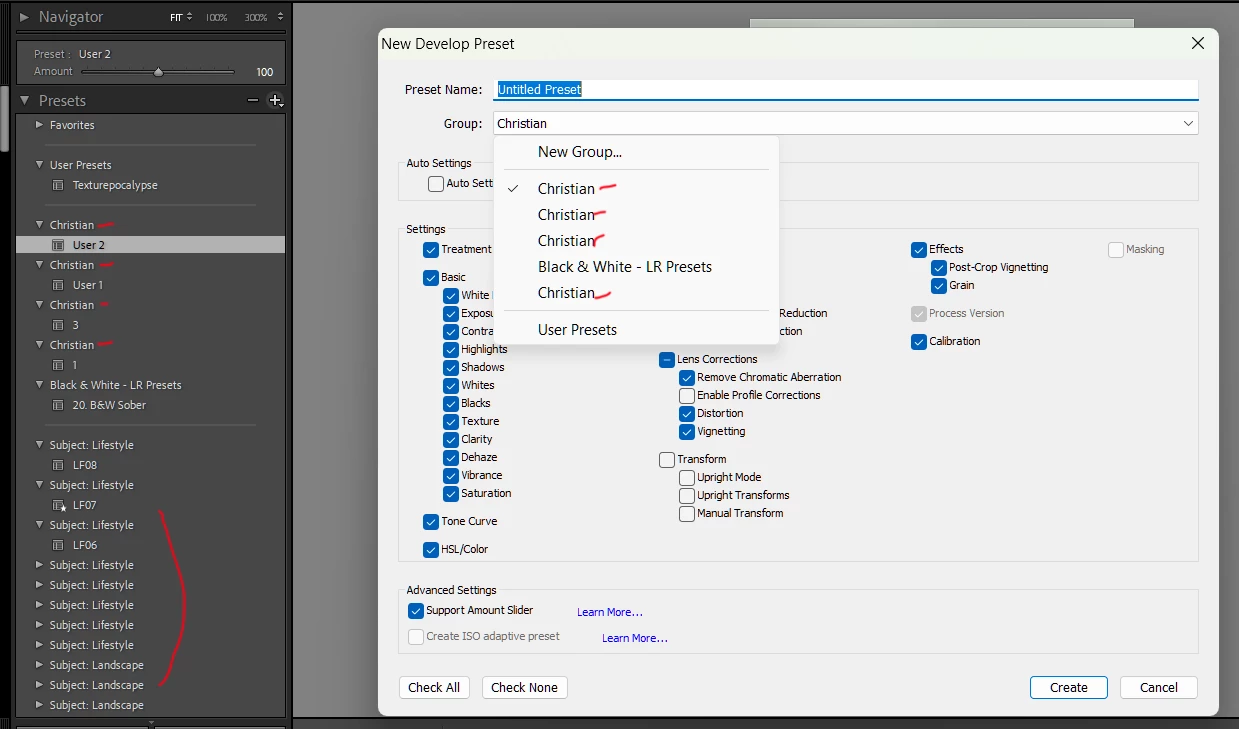
I spent all day looking for a solution and found nothing (by the way the solution editing the XMP file crs:Cluster="XX name" does not work in this case).
Any help is much appreciated, Thanks a lot!
 AdChoices