



Edit Capture Time for a number of photos sets the wrong time
I’m using Lightroom Classic 15.2 release and Camera Raw 18.2 on Windows 11 Pro 10.0.26200 Build 26200.
I scanned 20 negatives to 92% JPG with my Epson PerfectionV800 Photo using Silverfast 9 and gave them sequential names so they would sort correctly when sorted by Filename. I now want to set the Capture Date so they sort correctly when sorted by date.
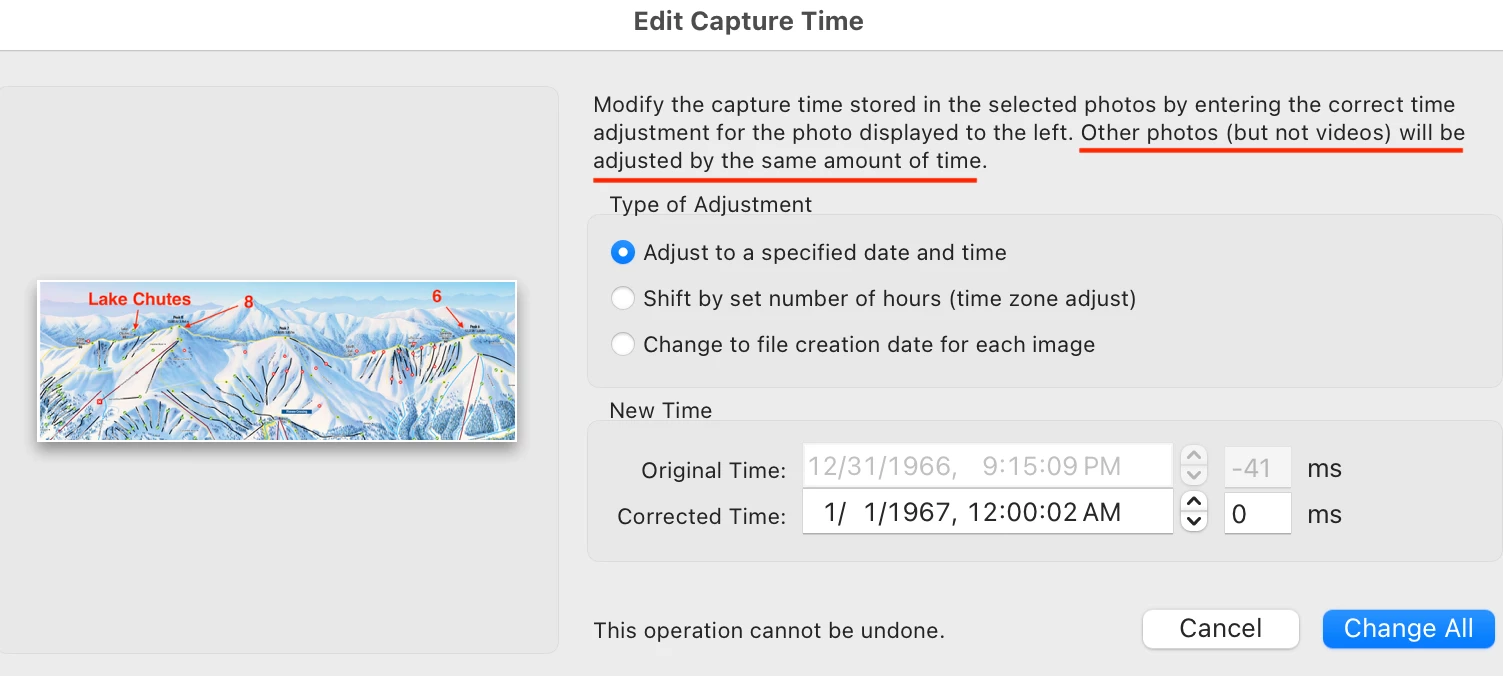
I selected the first photo and used Shift-Click to select the last photo in the folder (roll) so all photos are selected. I then used Metadata->Edit Capture Time and set the Date/Time to 1/1/1967 12:00:00 AM 000ms, which is the scheme that I use when I know only the year.
The result: the first photo was set correctly, but the rest were set like this (still sorted by name):
01/01/1967 12:00:00.000 AM
12/31/1966 11:59:59.000 PM
12/31/1966 11:59:58.827 PM
12/31/1966 11:59:58.827 PM
12/31/1966 11:59:58.827 PM
12/31/1966 11:59:59.000 PM
12/31/1966 11:59:58.827 PM
12/31/1966 11:59:59.000 PM
12/31/1966 11:59:59.000 PM
01/01/1967 12:00:00.000 AM
12/31/1966 11:59:59.000 PM
01/01/1967 12:00:00.125 AM
01/01/1967 12:00:00.227 AM
01/01/1967 12:00:00.124 AM
01/01/1967 12:00:00.123 AM
01/01/1967 12:00:00.229 AM
01/01/1967 12:00:00.034 AM
01/01/1967 12:00:00.225 AM
01/01/1967 12:00:00.132 AM
01/01/1967 12:00:00.118 AM
(I added leading zeroes where needed to make this easier to read.)
I’ve now done this numerous times and the results always seem to be the same. I changed them all to a different date and changed it back and got the same results above. It makes no sense to me that photos 2-8 would be dated earlier than the date I set.
What I’d actually like: when setting the capture time on multiple photos, advance the milliseconds or even the seconds by a small amount so the photos sort in the order that I selected. Failing that, at least honoring the date/time I requested would be helpful.
To reproduce, just select a set of photos in a folder and set the date/time as above.

 AdChoices