
Participant
July 13, 2021
Answered

Edit In Lightroom and all the tool in the sub-menu are grayed out. Help!

  • July 13, 2021
  • 4 replies
  • 788 views

I am using Lightroom Classic 10.3

I did right click on Edit In and all the tool in the sub-menu are grayed out.

Anyone help me? I am very appreaciate it
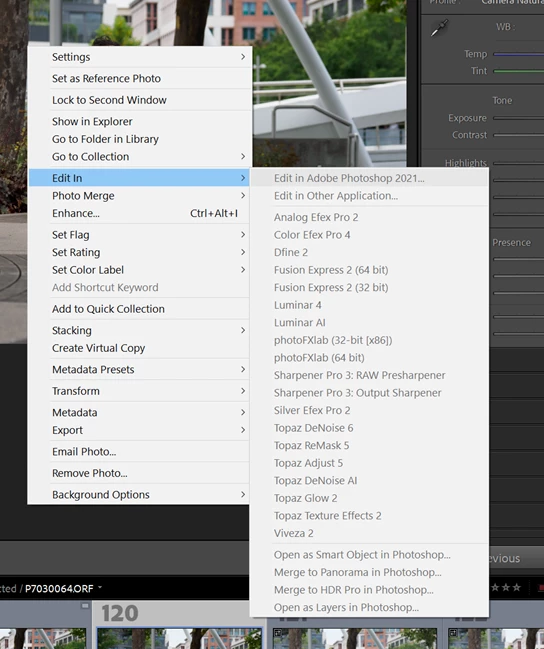
 

I was able to edit before. Thanks


This topic has been closed for replies.
Correct answer JP Hess

One instance in which this can happen is if you are working with Smart Previews. This can happen if the images are on an external hard drive that has been disconnected but smart previews have been generated to enable editing in the absence of the full-sized images. I don't know if this is the situation in your case, but smart previews will not be allowed to be edited by external editors from Lightroom.

4 replies

Known Participant
October 15, 2024

Hi,


I have the same issue after all the updates. I did specify all my external editors.


Please advise.

Inspiring
July 15, 2021
Weird.

You certainly already got the answer ;
go to Preferences
fond external editors
select the one you want
name and save

You can have multiple external editors. ( Photoshop, ON1…..) Just repeat the process above for each external editor.

Best Regards
Eric Pecquerie
Sent from Eric’iMac 2018
JP Hess
Inspiring
July 13, 2021

Smart previews are often used to replace the full-sized images when they are not available. If the full-sized images are on a removable hard drive that is disconnected, then simply connect that EHD. That will make the full-sized images available again.

JP Hess
JP HessCorrect answer
Inspiring
July 13, 2021

One instance in which this can happen is if you are working with Smart Previews. This can happen if the images are on an external hard drive that has been disconnected but smart previews have been generated to enable editing in the absence of the full-sized images. I don't know if this is the situation in your case, but smart previews will not be allowed to be edited by external editors from Lightroom.

ABDEFanAuthor
Participant
July 13, 2021

Yes,  I was working with Smart Review. Thanks for the answer.

Any solution for this? How do I disable working with Smart Review.  

Thanks