Answered
Edit In option
I recently converted from Lightroom to Lightroom Classic and find that all the programs which were in my "Edit In" option are not there. How do I get them back?

I recently converted from Lightroom to Lightroom Classic and find that all the programs which were in my "Edit In" option are not there. How do I get them back?
My SOP for a Manual addition of External Editors 🙂
1) In Preferences- External Editing
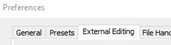
Look in- Additional External Editor section-
(*ignore any named editor already in the Preset box! Do not type anything here.)
Click on [Choose]
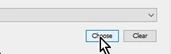
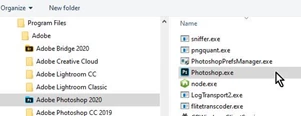
2) In the Finder/FileExplorer window that opens navigate to the App/exe program where it is installed.
Highlight the App and click [Choose] at the base of the Finder window.
(Mac systems, Apps are likely found in your "Applications" folder.)
(Windows Example: To add Photoshop 2020 as an Additional External Editor- navigate to-
C:\Program Files\Adobe\Adobe Photoshop 2020\Photoshop.exe)
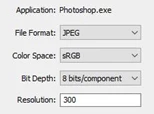
3) You will see your chosen App/Program.exe name appear UNDER the Preset box :
Application: ......Program name
4) Set up the options for the type of file that your External Editor needs. That could be a JPG 8bit or something else.
5) ***Now- the 'tricky' part! Click back on the Drop-down menu at the end of the [Preset:] box, and select {Save current settings as a new preset...} from the drop-down menu.
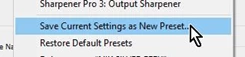
6) Type a NAME for the preset as you would like to see. Then click the [Create] button.
7) Done. You have another editor listed in External Editors from the [Edit-In] menu.
Already have an account? Login
Enter your E-mail address. We'll send you an e-mail with instructions to reset your password.
 AdChoices