
Participant
June 7, 2025
解決済み

Editing masked parts of a picture and only them in Lightroom Classic version 14.3.1

  • June 7, 2025
  • 返信数 1.
  • 302 ビュー

How can I edit masked parts of a picture and only them in Lightroom Classic version 14.3.1? Whenever I try with the tonecurve, since the basic sliders are gone it affects the entire picture.
解決に役立った回答 dj_paige

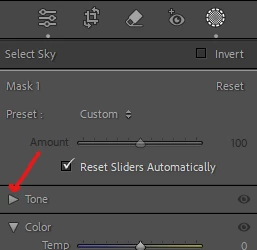
There is a basic panel for masking, but it is called "Tone". Perhaps it has been (accidentally) closed. Click on the triangle next to Tone.


返信数 1

JohanElzenga
Community Expert
Community Expert
June 7, 2025

You need to select the mask in the mask panel, and then use the tools in the mask panel. Check that this panel is not collapsed, so you are using the main panel sliders and curves, without realising that.


-- Johan W. Elzenga
Participant
June 7, 2025
OK, but the problem is that there is no slider for for example exposure, black, white, highlights and shadows in the masking section.
dj_paige
dj_paige解決!
Legend
June 7, 2025

There is a basic panel for masking, but it is called "Tone". Perhaps it has been (accidentally) closed. Click on the triangle next to Tone.