


Enabling GPU displays image too small in Develop module on Surface
In the video is this scenario is shown:
- start in GPU off
- GPU is switched on, note the display changing
- GPU of, GPU on
- Open close strip
- GPU off
It is clear that the behavior with GPU fails to update the screen correctly.
While pasting below System Info I noticed:
Displays: 1) 1440x960, 2) 1920x1200
However, the display 1 is 2880x1920, with scale 200% as recommended:
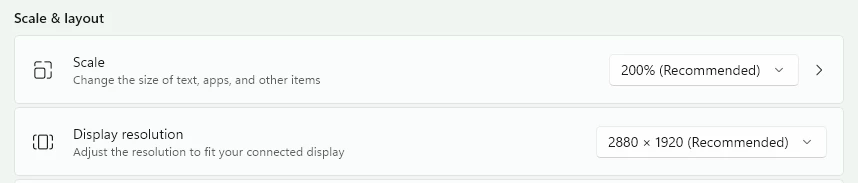
Indeed switching the scale to 100 % resolves the issue. Alas, it makes the application too small to use....
Is this another setting to change?
Is this Adobe, Microsoft or Qualcomm to resolve?
System Info
Lightroom Classic version: 15.0.1 [ 202511041508-dddee541 ]
License: Creative Cloud
Language setting: en
Operating system: Windows 11 - Home Premium Edition
Version: 11.0.26200
Application architecture: arm64
System architecture: arm64
Logical processor count: 12
Processor speed: NA
SqLite Version: 3.36.0
Adobe GSDK Version: 1.4.0.171
CPU Utilisation: 6.0%
Power Source: Plugged In
Built-in memory: 32327.7 MB
Dedicated GPU memory used by Lightroom: 148.4MB / 128.0MB (115%)
Real memory available to Lightroom: 32327.7 MB
Real memory used by Lightroom: 2813.6 MB (8.7%)
Virtual memory used by Lightroom: 3525.8 MB
GDI objects count: 2907
USER objects count: 2718
Process handles count: 8024
Memory cache size: 28.6MB
Internal Camera Raw version: 18.0 [ 2389 ]
Maximum thread count used by Camera Raw: 5
Camera Raw SIMD optimization: SSE2
Camera Raw virtual memory: 334MB / 16163MB (2%)
Camera Raw real memory: 444MB / 32327MB (1%)
Cache1:
NT- RAM:0.0MB, VRAM:0.0MB, Combined:0.0MB
Cache2:
m:28.6MB, n:0.0MB
U-main: 117.0MB
System DPI setting: 96 DPI
Desktop composition enabled: Yes
Standard Preview Size: 2048 pixels
Displays: 1) 1440x960, 2) 1920x1200
Input types: Multitouch: Yes, Integrated touch: Yes, Integrated pen: Yes, External touch: No, External pen: No, Keyboard: No
Graphics Processor Info:
DirectX: Qualcomm(R) Adreno(TM) X1-85 GPU (31.0.112.0)
Init State: GPU for Display supported by default with image processing and export supported in the custom mode
User Preference: GPU for Display disabled
Enable HDR in Library: OFF
GPU for Preview Generation: Off (S4_0)
Application folder: C:\Program Files\Adobe\Adobe Lightroom Classic
Library Path: C:\Users\Diederick\Lightroom\Lightroom Catalog.lrcat
Settings Folder: C:\Users\Diederick\AppData\Roaming\Adobe\Lightroom
Installed Plugins:
1) AdobeStock
2) Any Tag
3) Flickr
4) jf Metadata Presets
5) Publisher, By The Turning Gate
Config.lua flags:
Audio and Video info: Loading
 AdChoices