
Known Participant
November 4, 2025
Answered

Enter RGB Values in Color Grading?

  • November 4, 2025
  • 1 reply
  • 63 views

Hi,

Is there a way to enter RGB (0-255) values into the Color Grading input directy, ratehr than using the "Color wheel"? is seems very inaccurate this way? It also doesnt display teh RGB value you have selected on teh wheel?
Correct answer Rikk Flohr_Photography

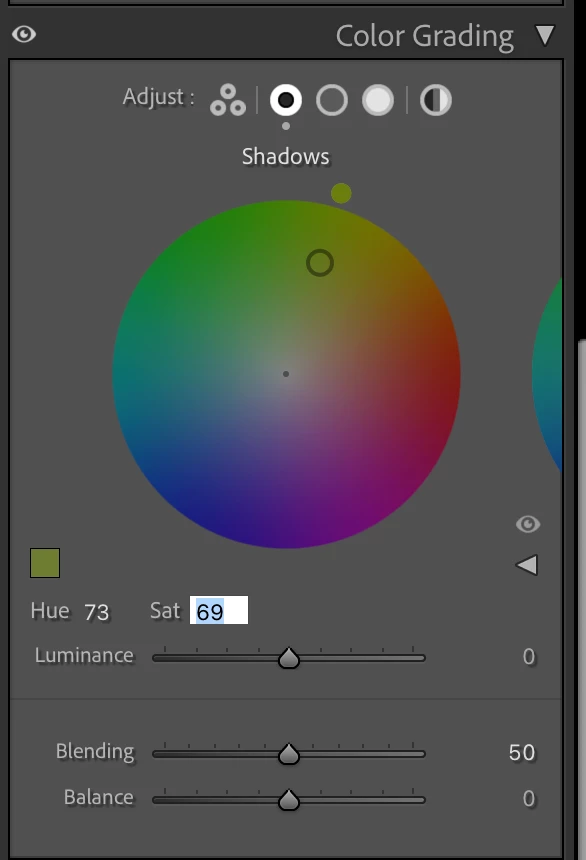
You can enter values of 0-100 for all entries in each Tonal-range Group: Shadows, Midtones, and Highlights. You need to switch out of the three-color wheel view to the single-color wheel view using the icons at the top of the panel. When looking at a large wheel instead, it is possible to enter values directly into Hue, Saturation, Luminance, Blending.,and Balance.


Keep in mind that Lightroom Classic operates in a 16-bit color space, and the 0-255 scale has limited significance. Values will be 0-100. 


1 reply

Rikk Flohr_Photography
Community Manager
November 4, 2025

You can enter values of 0-100 for all entries in each Tonal-range Group: Shadows, Midtones, and Highlights. You need to switch out of the three-color wheel view to the single-color wheel view using the icons at the top of the panel. When looking at a large wheel instead, it is possible to enter values directly into Hue, Saturation, Luminance, Blending.,and Balance.


Keep in mind that Lightroom Classic operates in a 16-bit color space, and the 0-255 scale has limited significance. Values will be 0-100. 


Rikk Flohr: Adobe Photography Org