Participant
February 17, 2020
Answered

Entering keyword tags

  • February 17, 2020
  • 1 reply
  • 275 views

Hello, when manually entering keyword tags, Lightroom automatically adds the word gradually and I can then select it in the pop-up menu. The suggestions are narrowed down more and more per letter.

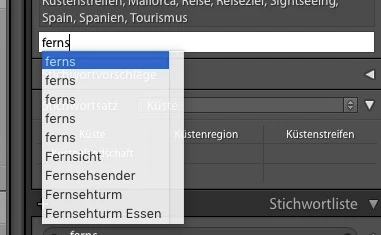
I now have the problem that a word “ferns” is suggested in the list 5 times! Other words starting with "ferns" are also in the list. But the word “ferns” does NOT exist in my keyword list… How can I clear the pop-up menu or where is the word “ferns” stored at all?

LR Classic 9.1


see attached image:
This topic has been closed for replies.
Correct answer johnrellis

At least some of the bugs with keyword auto-complete were fixed in LR 9.2:

https://feedback.photoshop.com/photoshop_family/topics/deleting-a-keyword-from-the-keyword-list-doesnt-remove-it-from-auto-complete


Try updating to LR 9.2.


[Use the reply button under the first post to ensure replies sort properly.]

1 reply

johnrellis
johnrellisCorrect answer
Legend
February 18, 2020

At least some of the bugs with keyword auto-complete were fixed in LR 9.2:

https://feedback.photoshop.com/photoshop_family/topics/deleting-a-keyword-from-the-keyword-list-doesnt-remove-it-from-auto-complete


Try updating to LR 9.2.


[Use the reply button under the first post to ensure replies sort properly.]