thierryv96640395
Inspiring
April 12, 2026
Answered

erreur à l'application d'un profil lineaire à l'importation de nouvelles photo dans LR classic

  • April 12, 2026
  • 1 reply
  • 39 views

Je souhaite appliquer un profil lineaire à mes photo lors de l'importation dans LRc, un tel profil est déterminé pour une camera bien précise.
Ce qui se passait avant et qui me convenais:

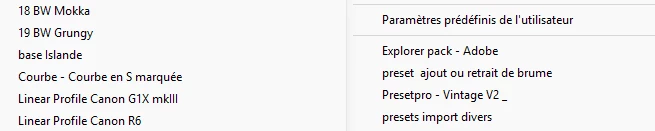
J'avais importé un profil (chez Tony Kuyper) pour mon eos R6 et je l'ai installé via caméra raw en PS comme recommandé. A l'import des photos en LRc ce profil était disponible et utilisable.

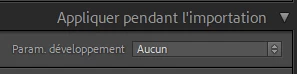
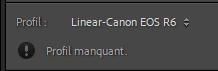
Maintenant je suis passé au R6mk3. J'ai donc imorté et installé le profil adequat. Il est disponible dans camera raw et aussi dans le module développement de LRc mais il n'est pas disponible à l'importation des photos. De plus comme je n'ai pas le bon profil je marque l'option "sans profil" à l'importation mais LRc semble appliquer le profil R6 (ancien) tout en spécifiant après dans le module dev qu'il est manquant

A cette étape je peut cliquer les 2 triangle et choisir le profil R6mk3.

Merci de votre aide
Thierry
Sur le PC, dans... cameraRaw>cameraProfiles>imported, il y a l'ancien profil R6.dcp et le nouveau R6mk3.dcp.

mais dans ...roaming>adobe>camera raw>settings, je retrouve un fichier "linear profile R6.xmp mais aucune trace d'un profil R6mk3

    Correct answer Anshul_Saini

    Hi @thierryv96640395,


    Thanks for the clear explanation and screenshots. Please try the below recommended approach to apply the R6 mark III profile at import:

    • Go to the Develop module

    • Select an R6 mark III image

    • Apply the correct Linear R6 mark III profile you want

    • Create a new preset: Go to Presets panel > "+" > Create Preset > Check only "Treatment & Profile" (and any other desired settings) > Save the preset

    • Then, in Import, select this preset under Apply during import


    Once you create the preset, the behavior should match what you had with the R6.


    Let me know if anything doesn’t line up after trying this.


    Best regards,

    Anshul Saini

    1 reply

    Anshul_Saini
    Community Manager
    Anshul_SainiCommunity ManagerCorrect answer
    Community Manager
    May 1, 2026

    Hi @thierryv96640395,


    Thanks for the clear explanation and screenshots. Please try the below recommended approach to apply the R6 mark III profile at import:

    • Go to the Develop module

    • Select an R6 mark III image

    • Apply the correct Linear R6 mark III profile you want

    • Create a new preset: Go to Presets panel > "+" > Create Preset > Check only "Treatment & Profile" (and any other desired settings) > Save the preset

    • Then, in Import, select this preset under Apply during import


    Once you create the preset, the behavior should match what you had with the R6.


    Let me know if anything doesn’t line up after trying this.


    Best regards,

    Anshul Saini

    thierryv96640395
    Inspiring
    May 6, 2026

    Hi Anshul,
    your solution is a good one, it works wel. The strange remains that applying the new preset at import result with the old linear R6mark III profile used in the all the photos. But is not a problem.
    Thanks a lot
    how do I close the request as solved?
    Thierry