



Participant
January 10, 2025
Answered

Erreur à l'ouverture de Lightroom (lrcar-data Introuvable) ???

  • January 10, 2025
  • 2 replies
  • 688 views

Bonjour, depuis la dernière mise à jour quand je clique sur l'icone de raccourci sur mon bureau de Lightroom il me dit l'erreur suivant " Lightroom Ircat-data introuvable" alors ce que je dois faire pour réeussir à l'ouvrir est d'aller dans mon dossier image ou est stoquer la dernière version de ma sauvegarde de mon catalogue et quand je clique dessus alors il s'ouvre sans problème.


Ensuite si je referme Lightroom et que j'essaie de l'ouvrir à nouveau alors il faut que je refasse les memes étapes pour arriver à relancer en passant par ma sauvegarde dans le dossier image et cliquer sur le fichier lrcat.

Que faire, je ne comprends pas pourquoi quand je clique sur l'icone du bureau ca ne fonctionne pas et quand je clique sur mon fichier lrcat dans ma sauvegarde tout souvre correctement!!! Merci à vous 🙂

Correct answer Rob_Cullen

"when I click on the shortcut icon on my Lightroom desktop"

Is this icon a shortcut to a CATALOG, or the Lr-Classic APP.?

If it is to a .LRCAT Catalog file then you may be constantly opening an 'old' catalog from this icon.


If so-  Find your latest Catalog .lrcat file with Windows File Explorer and [Double-click] on it to open this specific catalog.

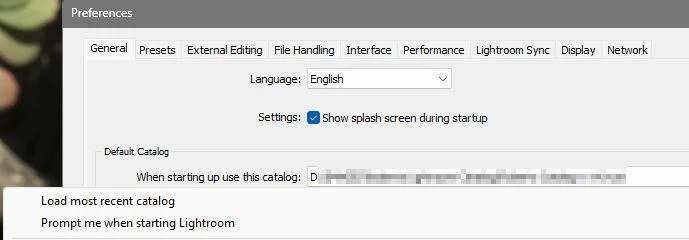
Then in Preferences /General- change the option that determines which catalog opens (and delete the old catalog shortcut icon)

.

2 replies

Rob_Cullen
Community Expert
Rob_CullenCommunity ExpertCorrect answer
Community Expert
January 11, 2025

"when I click on the shortcut icon on my Lightroom desktop"

Is this icon a shortcut to a CATALOG, or the Lr-Classic APP.?

If it is to a .LRCAT Catalog file then you may be constantly opening an 'old' catalog from this icon.


If so-  Find your latest Catalog .lrcat file with Windows File Explorer and [Double-click] on it to open this specific catalog.

Then in Preferences /General- change the option that determines which catalog opens (and delete the old catalog shortcut icon)

.

Regards. My System: Windows-11, Lightroom-Classic 15.1.1, Photoshop 27.3.1, ACR 18.1.1, Lightroom 9.0, Lr-iOS 10.4.0, Bridge 16.0.2 .
Participant
January 11, 2025

Thank's Rob, you found exactly the source of the problem I had not seen I had not checked that the icon on my desktop was an lr-cat and finally was not the shortcut that I usually had so a huge thank you and happy new year to you! 🙂📸

MassC
Legend
January 10, 2025

Hi @Serge_1534

Thank you for reaching out! Could you confirm which version of Lightroom Classic you’re using? You can find this information by going to Help > System Info while in Lightroom Classic.

Have you moved your catalog to a different location, or is it stored on a removable device?

^CM

Participant
January 10, 2025

Hello, I have the latest version of lightroom classic and everything is up to date.
For my catalog it is placed in the image folder of my C drive