CS Chua
Inspiring
October 16, 2024
Question

Error after upgrade to version 14

  • October 16, 2024
  • 1 reply
  • 1115 views

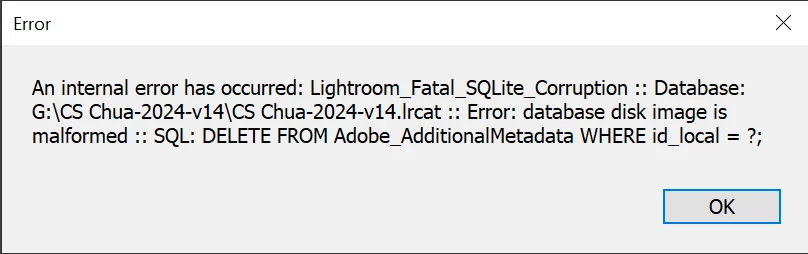
A couple of photos showing as unable to build smart sync. So tried to run a synchronise on the folder. The above error pop up. Please advise .. 

 

This topic has been closed for replies.

1 reply

frankv80024001
Participating Frequently
October 16, 2024

similar error here too:

While working in Editing mode, this error message keeps popping up: 

after pressing ok, LR is forced to close because the catalogue is deemed corrupt. When restarting LR, the system detects a corrupt catalogue and runs a catalogue test. Then, the catalogue is required to be repaired. After successful  catalogue repair, LR then works fine for some minutes but then the same cycle starts all over again. Any idea?


Version info:


CS Chua
CS ChuaAuthor
Inspiring
October 17, 2024

It looks like the v14.0 had some serious bug causing the catalog to be corrupted. Same problem as yours. After it repaired the error I capture was an attempt to remove photos in all synced photos collection reported as unable to build smart previews. 
Yesterday notice a new revision was available 14.0.1. Terminated the LrC 14.0 process. Installed rev 14.0.1 and had it running a repair. It is still running and from the windows resource monitor looks like it is rescanning (probably) all the photos. 
Still repairing after 8 hours. 


CS Chua
CS ChuaAuthor
Inspiring
October 17, 2024

I first got noticed of a new revision while using the LrMobile on my tablet and updated the Android Mobile to v10.01. I had been using the LrMobile with my tablet to edit selected photos that I sent to the cloud from LrC. So there's quite a bit of traffic to and from LrC to Adobe's AWS cloud. That was 14th Oct. I updated the LrC the next afternoon and immediately after less than 5 minutes it corrupt the catalog. Like you after repairing it corrupt the catalog again and again. I have daily backup of the catalog and restore to a fresh new folder however it reported that it needs the lrcat-data or I will lose the AI edits. Unlike the smart previews and previews etc one could restart Lightroom without them as Lightroom will recreate as such I don't backup those folders as there are usually quite large. It looks like if and when Iightroom v14 can run as stable as v13 I will have to include the lrcat-data folder into my daily backup. Otherwise will have no choice but to roll back to V13 and rebuilt from scratch.

Question:
Does anyone know if the AI edits (photos having AI edits were done on LrMobile) in the cloud will be sync back to LrC into the folder lrcat-data, if I rebuild LrC catalog on a new folder with just the lrcat file? I have close to a thousand photos with AI edits done since Lightroom had the regenerative remove and blur released. Many hours were spend on AI edits all done exlcusively via the LrMobile.