
Inspiring
November 15, 2022
Answered

Error exporting Size limit

  • November 15, 2022
  • 1 reply
  • 672 views

https://drive.google.com/file/d/1jYgnux85zfGlfRGOw7Gca_PelcvR3dGL/view?usp=sharing 

I get this error message when I export images from Lightroom to folder. I have not set any limit on size nor have I seen where those 30Mb limit is fixed. Went to export dialogue (nothing there) also not in preferences.

I use JPG mini Pro and I thought this might trigger this warning but have not seen any preferences where they limit the size.


The image were exported correctly in spite of the error warning in Lightroom


Could this be a bug?
This topic has been closed for replies.
Correct answer johnrellis

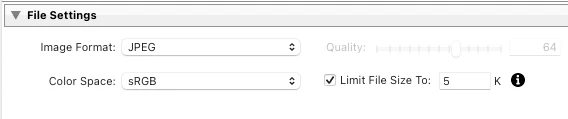
I'm pretty sure the message, "Failed to process image: Image exceed size (MP) limit" is coming from the JPEG Mini plugin.  I think it may be telling you that it thinks you set the Export option File Settings > Limit File Size To a size that was smaller than the minimum size JPEG Mini could make.  (The "(30)" refers to the number of files that generated that error.)


Triple-check that Export settings isn't setting that option:


Assuming it isn't, try making a new Export preset from scratch.  Infrequently LR corrupts the current export settings and preset settings.


And if that doesn't help, you might have to contact JPEG Mini support.

1 reply

johnrellis
johnrellisCorrect answer
Legend
November 16, 2022

I'm pretty sure the message, "Failed to process image: Image exceed size (MP) limit" is coming from the JPEG Mini plugin.  I think it may be telling you that it thinks you set the Export option File Settings > Limit File Size To a size that was smaller than the minimum size JPEG Mini could make.  (The "(30)" refers to the number of files that generated that error.)


Triple-check that Export settings isn't setting that option:


Assuming it isn't, try making a new Export preset from scratch.  Infrequently LR corrupts the current export settings and preset settings.


And if that doesn't help, you might have to contact JPEG Mini support.

mastixAuthor
Inspiring
November 16, 2022

Thank you very much. I have contacted Jpg Mini Pro support to see what they say. It only happens with the big files 15000+ pixels on one side and not the others. They get exported but it seems as the plugin does not quick in and I get this warning in LR.

Thank you for your input


Cristian