Chrisn N
Inspiring
December 9, 2019
Question

Error Message And Delay - Edit In Photoshop Elements Editor

  • December 9, 2019
  • 1 reply
  • 1594 views

I am using Lightroom 6. I recently upgraded to Photoshop Elements 2020. I also have PS Elements 9 on my system (32 bit). The problem is I am unable to edit a from LR6 into PSE 2020. PSE 2020 is the default editor. PSE 9 is the secondary editor.


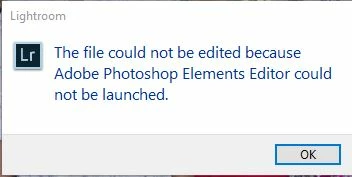
In LR when I right Click Edit in/PSE 2020then PSE 2020 launches, then there is a 2 minute delay. Then I get an error message, "The file could not be edited because Adobe Photoshop Elements editor could not be launched". Then when I close the error message the file opens in PSE 2020 just fine (with LR adjustments). So it does work but I need to find a way to avoid the error message and the 2 minute delay.


I don't have any problems if I edit in PSE 9 as a secondary editor. The file opens immediately with LR adjustments in PSE9. 


Here is what I have tried so far. I have uninstalled PSE 9 so PSE 2020 was the only editor. I have reset LR preferences. Still the same problem. I tried PSE 2020 as the secondary editor as well but that didn't help.


Your advice would be appreciated. 


Kind regards

Chris 
 

This topic has been closed for replies.

1 reply

GoldingD
Legend
December 9, 2019

From your statements what you have not attempted is to uninstall PSE 2020, then reinstall.


Chrisn N
Chrisn NAuthor
Inspiring
December 9, 2019

Thank you David. I was thinking of trying that as a last resort. Actually I previously had PSE 14 (64 bit) on my system and LR had the same issue with the delay and the error message. When I uninstalled PSE 14 and installed PSE 2020 as a new installation I got exactly the same problem. My gut feeling is some settings or registry entries in LR need to be changed. 


Kind regards

Chris

Chrisn N
Chrisn NAuthor
Inspiring
December 13, 2019

Thanks David. I tried uninstalling and reinstalling PS Elements 2020 but the problem persists. There must be a way to find out what is causing the 2 minute delay and Error message before the file is finally opened in PS Elements.


Curiously, if I try to open a jpg file and select "without LR adjustments" it opens in PS Elements 2020 just fine. The problem only ocurrs if I try and open a raw file, or open a jpg file with LR adjuctments.


Kind regards

Chris