

photopoeth
Inspiring
December 4, 2024
Question

Error message due to lack of privileges on Mac

  • December 4, 2024
  • 1 reply
  • 661 views

Ich habe gerade in LrC diese Fehlermeldung bekommen:
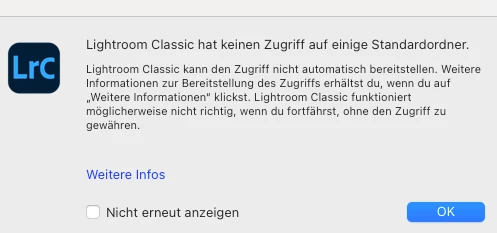
In English:
Lightroom Classic does not have access to some default folders.
Lightroom Classic cannot provide access automatically. For more information on providing access, click ‘More information’. Lightroom Classic may not work properly if you continue without granting access.

How can I find out what privileges I have to provide to LrC? I have already granted Full Disk Access, so I really don't know what might be the problem. Sorry - I'm a Mac Newbie. 🤷‍♂


This topic has been closed for replies.

1 reply

Sameer K
Community Manager
Community Manager
December 4, 2024

Hey, @photopoeth. Thanks for adding the screenshot. Has this error started to appear since a recent upgrade to Lightroom Classic? 


You can go to the following location to launch Lightroom Classic via the terminal.

  • In Finder > Application Folder > Lightroom Classic > Right-click on Lightroom(.)app > Show Package Contents > Contents > macOS > Lightroom - double click to open.
  • In the Terminal window, you'll see the specific folders that Lightroom is having trouble accessing. 

You can follow the steps here to add permissions to folders on macOS: https://adobe.ly/4f3oRwg


Let us know how it goes. Thanks!
Sameer K

(Type '@' and type my name to mention me when you reply)

photopoeth
Inspiring
December 4, 2024

Thanks a lot - I will investigate into it. The error shows up very rarely. I haven't had time to read your links (in the middle of an edit after a shooting right now). Do I understand this correctly? I am supposed to start LrC via the procedure you suggest. When the error pops up, I can check what may be the cause. Right?

To your question: I recently switched from Windows to Mac. On Windows I was working with LrC 13.x and didn't make the upgrade. But on MacOS LrC 14.0.1 has been installed automatically. So yes, it started with 14.0.1, but I never had the chance to work wit an older version on the Mac.


BR and I'll let you know how things go. BR