
pixeltaker
Inspiring
December 11, 2023
Question

Error message on import

  • December 11, 2023
  • 1 reply
  • 984 views

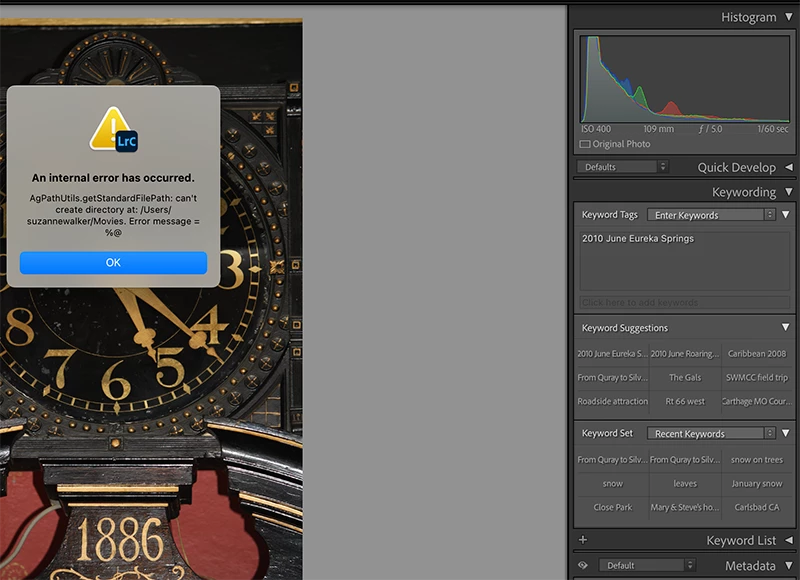
This is the error message I get when trying to import a photo that is on my desktop.

This topic has been closed for replies.

1 reply

JohanElzenga
Community Expert
Community Expert
December 11, 2023

You are trying to copy the imported images into your 'Movies' folder and create a subdirectory in that folder (possibly dated subfolders). So the first question is if you really want to store your imported photos in there? Are these movies? You say 'photo' in your message. If it is indeed not a movie but a photo, then you may have selected this destination folder by mistake. The second question is why Lightroom can't create a subdirectory. This could be a permissions problem. Does Lightroom have 'Full Disk Access'? See Quick Tips: How to give Full Disk Access to Lightroom Classic on macOS


-- Johan W. Elzenga
pixeltaker
Inspiring
December 11, 2023

I have no movies.  I don't even know where to find that folder.  I need more information on how to change 'the destination folder".   So what I am trying to do in LR Classic is import to a folder in my catalog.  I selected the correct folder for import, but when I tick import, the message above shows up.  I've not had this problem before. 

JohanElzenga
Community Expert
Community Expert
December 11, 2023
