Participating Frequently
June 12, 2023
Question

Explantion Piont

  • June 12, 2023
  • 2 replies
  • 237 views

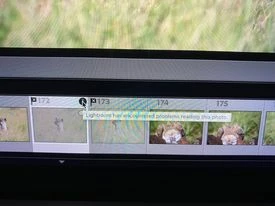
Im hoping someone can help because no one is answering the phone for tech support. I use a Mac Book Pro latest system and the lastest version of Lightroom, l used a 5tb LaCie external hard drive for years with all my images on it, never had an issue, but recently l have copied all my images onto a new 4tb LaCie external and evey now and then l get an explaination piont on the oppisite side of the flag symbol on the film strip, see image, but the werid thing is if l restart Lightroom or leave it and carry on editing it dissappears. Could it be that the external hard drive isnt quick enough?

Any help would be most appricated
This topic has been closed for replies.

2 replies

Ian Lyons
Community Expert
Community Expert
June 12, 2023

This issue has been reported a number of times since 12.3 was released. I've experienced it myself on files that are perfectly ok. I've also seen it across multiple drives, computers, etc. The fact that it disappears after a relaunch  of LrC is a good indication that there is no actual damage to the file or problems with the disk.

Sarsha73Author
Participating Frequently
June 12, 2023

Phew, thank you Ian Lyons makes me feel a little bit better, hopefully if this is the case it gets fixed. Thank you again

Ian Lyons
Community Expert
Community Expert
June 12, 2023

So far as I know the issue is random. As such, a fix more likely to be by accident than any deliberate action on the part of the engineering team.

johnrellis
Legend
June 12, 2023

The exclamation point in a black circle indicates LR has encountered problems reading the photo. If you click on it you'll see that explanation:


If the exclamation point goes away after a while, that does suggest there is some issue with the new drive. You might try plugging it directly into a port on the computer rather than through a hub, or a different port on the computer if it's already directly connected. And try a different cable.


(The pics you posted are too low-resolution to make much out. If you need to post a screenshot again, don't use your phone -- it's very easy to make a direct screenshot with Mac or Windows:

https://www.lightroomqueen.com/community/help/createscreenshot/ )


Sarsha73Author
Participating Frequently
June 12, 2023

Thank you John for your help, I will try a different cable. In failing that, your comment on a faulty drive could be the issue. Thank you again