Participant
January 5, 2023
Answered

Export in LrC

  • January 5, 2023
  • 3 replies
  • 542 views

Warum entsteht beim Export eines RAW-Fotos in LrC und des Abspeicherns in einem eigenen Ordner gleichzeitig ein weiteres JPG-Foto im Originalordner. Warum wird beim Löschen des einen JPGs auch das 2. gelöscht? Warum muss ich nach dem Export in einen Ordner diesen noch synchronisieren?


This topic has been closed for replies.
Correct answer AxelMatt

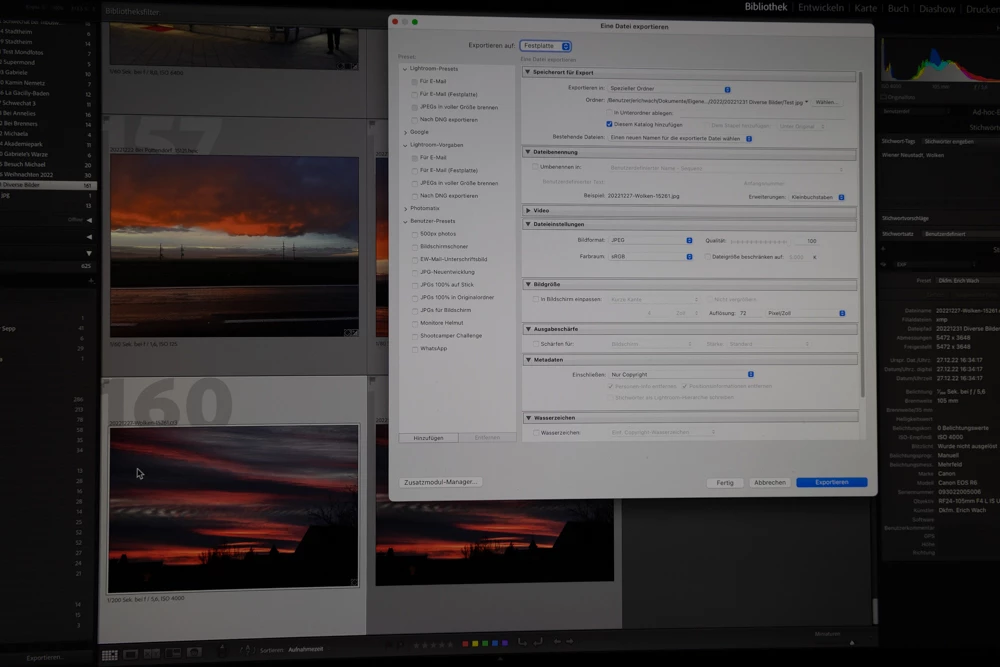
In any case when exporting a raw-file in a special folder a JPG is created as well in the special folder and, at the same time, in the original folder. Why there are now 2 JPGs in the catalog and on the hard disk of the Mac?

When I delete one of the JPGs and it does not make a difference whether I delete the JPG in the original folder or in the special folder, in any case both JPGs are deleted.
Activating “Add to this Catalog” means only that the folders in LrC need not to be synchronized.


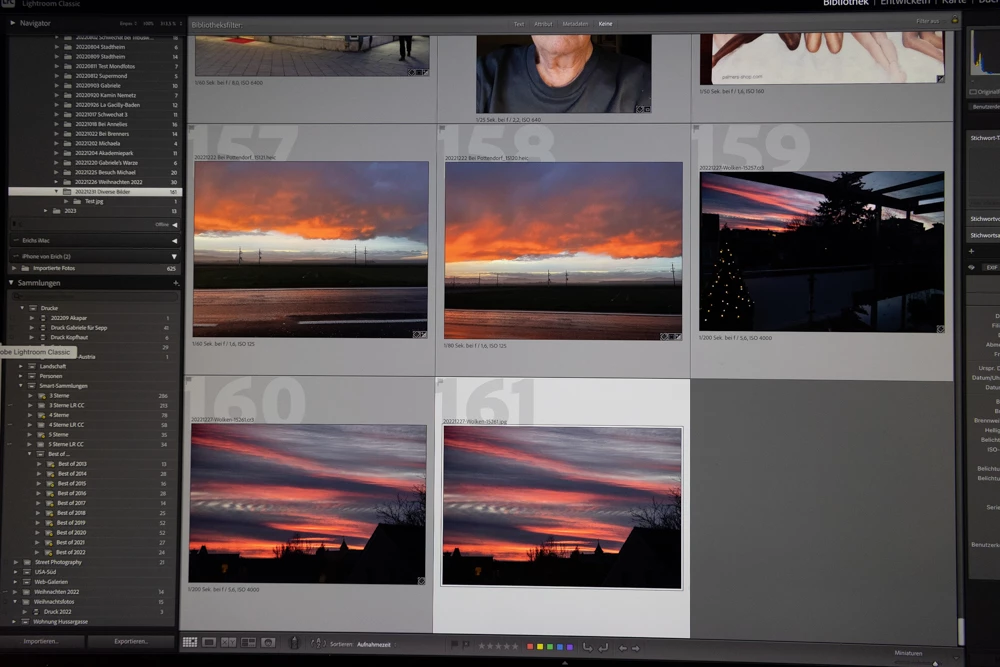
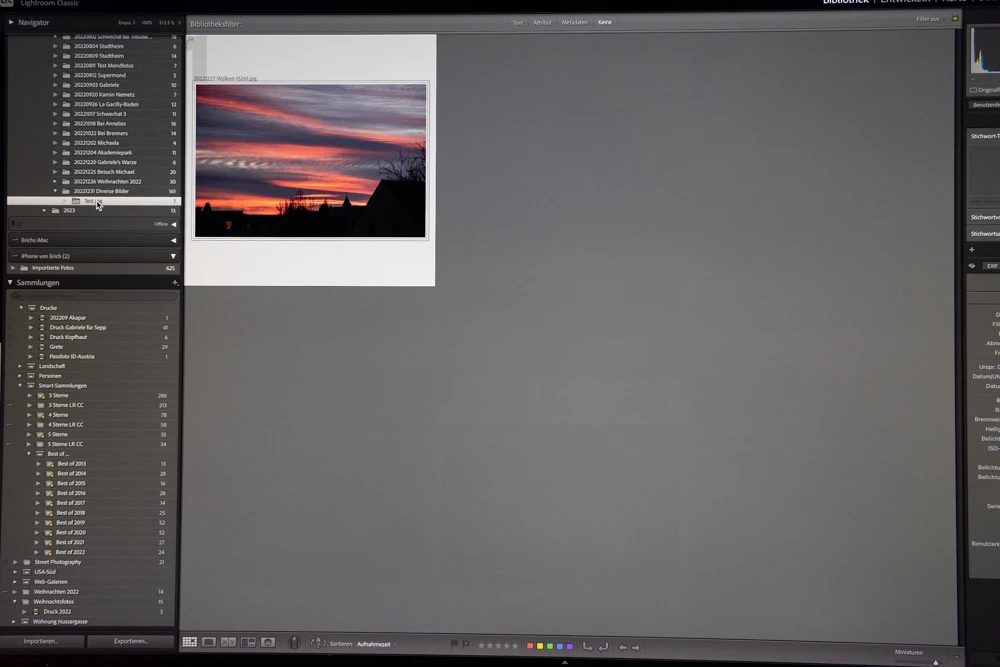
Ich habe mir das mal genauer angschaut. Es werden keine 2 jpegs exportiert, sondern nur eines in den Unterordner ...\Test jpg.

Wenn du dir über den Navigator den Inhalt des übergeordneten Ordners anzeigen lässt wird automatisch auch der Inhalt aller, in dem Verzeichnis enthaltenen Unterordner angezeigt. Es sieht für dich so aus als gäbe es das Bild zweimal. 


Wenn du dir den Inhalt der entsprechenden Verzeichnisse im Explorer bzw. Finder anschaust wirst du feststellen, dass es das exportierte JPEG nun in dem Unterordner "Test jpg" gibt. Es sollte mich doch ganz stark wundern wenn es nicht so wäre. 😉


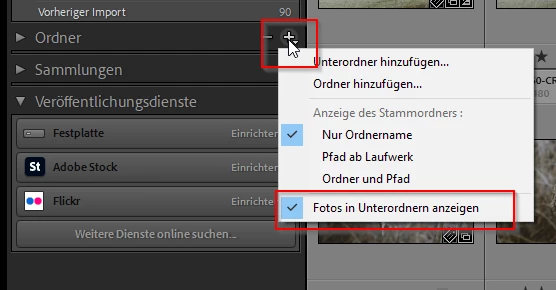
Du kannst dieses Verhalten aber auch ändern. Klicke im Bereichstitel "Ordner" mit der rechten Maustaste auf das Plussymbol. Im Popup-Menü deaktiviere die Option "Fotos in Unterordner anzeigen".


Der Screenshot stammt aus LR für Windows, sollte aber beim Mac genauso oder so ähnlich aussehen.


3 replies

Bob Somrak
Legend
January 13, 2023

deleted

M4 Pro Mac Mini. 48GB
dj_paige
Legend
January 5, 2023

Can you please explain what are you doing? Can you show us screen captures of your Export dialog box?


Creating a JPG in the original folder sounds like you may have checked "Add to This Catalog".


Why is the 2nd also deleted when deleting one JPG?


I don't understand what you mean.


Why do I still have to synchronize a folder after exporting to it?  


You don't have to, why do you think you do? Again, an explanation of what you are doing would be very helpful.


psionblauAuthor
Participant
January 5, 2023

In any case when exporting a raw-file in a special folder a JPG is created as well in the special folder and, at the same time, in the original folder. Why there are now 2 JPGs in the catalog and on the hard disk of the Mac?

When I delete one of the JPGs and it does not make a difference whether I delete the JPG in the original folder or in the special folder, in any case both JPGs are deleted.

Activating “Add to this Catalog” means only that the folders in LrC need not to be synchronized.

[Mod: Link deleted]

[Moderator]

[personal information removed per policy - 

https://community.adobe.com/t5/adobe-community-professionals/email-signatures-and-personal-information/td-p/4786467

[This is a public forum, not Adobe support, please do not post personal information]


dj_paige
Legend
January 5, 2023

I am still not understanding. When I export a RAW to a specific folder, I get the JPG export that I requested, I do not get one in the original folder. Only one file is exported, and so only one is deleted if I choose to delete it.


Repeating my earlier request: show us screen captures of your Export dialog box. Adding to my earlier request: show us screen captures of the two JPGs. Please use the "Insert Photos" icon to include these screen captures in your reply. Do NOT attach files.

AxelMatt
Community Expert
Community Expert
January 5, 2023

In a first step please try resetting the preferences of Lightroom Classic:   https://helpx.adobe.com/lightroom-classic/help/setting-preferences-lightroom.html


It's recommended to backup your preferences before you reset the preferences to the default settings: 

https://helpx.adobe.com/lightroom-classic/kb/preference-file-and-other-file-locations.html


What do the export settings look like?


My System: Intel i7-8700K - 64GB RAM - NVidia Geforce RTX 3060 - Windows 11 Pro 25H2 -- LR-Classic 15 - Photoshop 27 - Nik Collection 8 - PureRAW 5 - Topaz Photo