
Export of certain images doesn't work
Reproduction (probably only on my catalog)
I select the image, select a "normal" JPG export to Disk (RMB -> Export -> Export...). The progress bar at the top appears but never finishes.
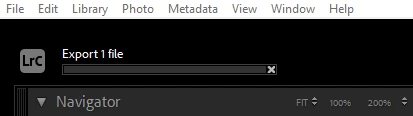
The file is never written to disk (but if the options say it should be placed in a subfolder, that subfolder is created).
The export works fine with other files in the same folder from the same source, with similar edits, etc. This only happens on 5 files out of ~100 from the same camera/phone and ~175 in the same folder. But it's only with the same camera.
Things I have tried so far
- Export to different folder and even drives
- Rename the file
- Change the quality & metadata settings (everything else is off anyway)
- Change the output format to PNG
- Turn off and/or force GPU export
Strange things I have noticed with these files
I cannot create virtual copies. Instead I get the following error message:
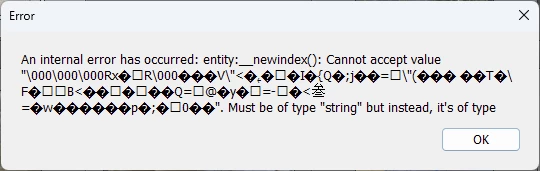
Sadly, I cannot resize the window or select the text inside it. Is there a way to get the full error message?
To try to fix this I ran "Optimize Catalog..." but it didn't help.
Does anybody know how to fix my library to get the export working again?
Workaround (bad/annoying)
- Remove the picture from lightroom
- Sync the folder
- Add the edits again
- Export works!
But this is annoying as all edits are lost in the process.
System
Lightroom Classic version: 14.2 [ 202502071718-3869eef7 ]
License: Creative Cloud
Language setting: en
Operating system: Windows 11 - Home Premium Edition
Version: 11.0.26100
Application architecture: x64
System architecture: x64
Logical processor count: 32
Processor speed: 3.3GHz
SqLite Version: 3.36.0
CPU Utilisation: 0.0%
Power Source: Plugged In
Built-in memory: 65461.5 MB
Dedicated GPU memory used by Lightroom: 310.1MB / 8018.0MB (3%)
Real memory available to Lightroom: 65461.5 MB
Real memory used by Lightroom: 2183.2 MB (3.3%)
Virtual memory used by Lightroom: 2628.0 MB
GDI objects count: 992
USER objects count: 2857
Process handles count: 3302
Memory cache size: 511.8MB
Internal Camera Raw version: 17.2 [ 2155 ]
Maximum thread count used by Camera Raw: 5
Camera Raw SIMD optimization: SSE2,AVX,AVX2
Camera Raw virtual memory: 181MB / 32730MB (0%)
Camera Raw real memory: 182MB / 65461MB (0%)

Cache1:
Final1- RAM:103.0MB, VRAM:2.0MB, IMG_6163.JPG
NT- RAM:103.0MB, VRAM:2.0MB, Combined:105.0MB

Cache2:
m:511.8MB, n:102.8MB

U-main: 102.0MB

System DPI setting: 96 DPI
Desktop composition enabled: Yes
Standard Preview Size: 1440 pixels
Displays: 1) 2560x1440, 2) 2560x1440
Input types: Multitouch: No, Integrated touch: No, Integrated pen: No, External touch: No, External pen: No, Keyboard: No

Graphics Processor Info:
DirectX: NVIDIA GeForce RTX 3070 (32.0.15.7216)
Init State: GPU for Export supported by default
User Preference: Auto
Enable HDR in Library: OFF

Application folder: C:\Program Files\Adobe\Adobe Lightroom Classic
Library Path: D:\Pictures\Lightroom5\lightroomCatalogue\lightroomCatalogue-v13-3.lrcat
Settings Folder: C:\Users\<redactedSnakeCaseUserName>\AppData\Roaming\Adobe\Lightroom

Installed Plugins:
1) SmugMug

Config.lua flags:

[Shortened - if necessary I can also post the GL details but it seems irrelevant to me.]


 AdChoices