

johnrellis
Legend
July 27, 2024
Question

Export option Add To Stack not available when exporting from a smart collection

  • July 27, 2024
  • 3 replies
  • 258 views

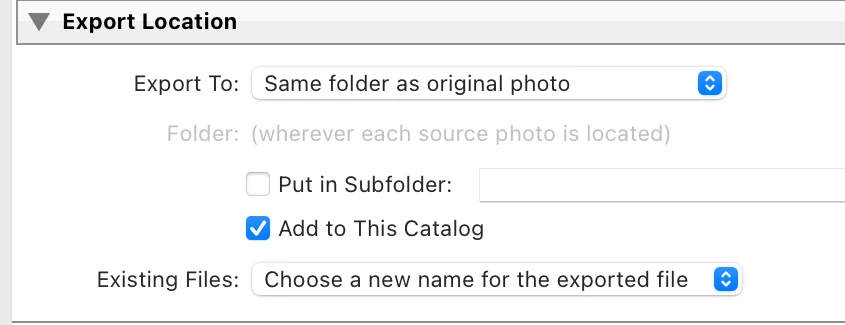
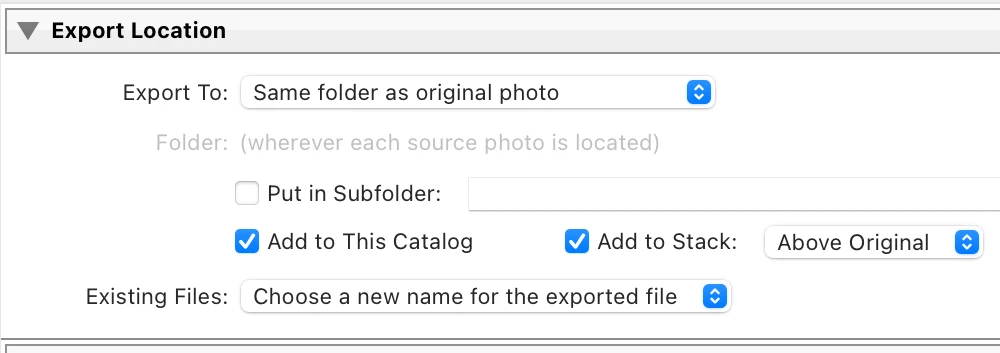
The Export option Add To Stack option isn't available when exporting from a smart collection, though it is available when exporting from a regular collection. Since the stack is created in the folder even when exporting from a regular collection, there is no valid design reason to restrict the option when exporting from a smart collection.


To reproduce on LR 13.4 / Mac OS 14.5:


1. Select a smart collection and then a photo in that smart collection.


2. Do File > Export.


3. Select the options Export To: Same Folder As Original Photo and Add To This Catalog, and observe that the option Add To Stack is not visible (incorrect):
 

4. Select a collection and a photo in that collection.


5. Do File > Export. 


6. Select the options Export To: Same Folder As Original Photo and Add To This Catalog, and observe that the option Add To Stack is visible (correct):


This topic has been closed for replies.

3 replies

Bob Somrak
Legend
July 27, 2024

It should be noted that in another thread where this was first brought up the OP discovered that ADD TO STACK does work if you use an Export Preset that has the option enabled.  This ONLY works if you use the Right Click Context Export dropdown and choose one of the Export Presets.  This works so there is no reason to not allow it in the Export Dialog.


M4 Pro Mac Mini. 48GB
johnrellis
Legend
July 27, 2024

"this does not occur if you are in a folder. Just when you are in a collection."


Add To Stack is allowed when in a regular collection, in which case the stack is created in the folder, not the collection.  But it isn't allowed in a smart collection, indicating there isn't a valid desgin reason for this restriction.

GoldingD
Legend
July 27, 2024

I was going to say that Adobe will probably come back at state "As Designed" And to not be surprised that a monitor will move this post to Discussions. BUT, as stated by the Author, this only occurs in Smart Collections, not in normal collections.


And I can repeat it (Windows 11 in  my case)


Does any member have a different experience, perhaps a member with say LrC v12 running?