
Inspiring
May 29, 2019
Answered

Export Raw CR2 to TIFF - Color Space Wrong for AdobeRGB (1998)

  • May 29, 2019
  • 3 replies
  • 1808 views

Lightroom version 8.3

Windows 10 Pro

Take a raw CR2 file.

Export for two cases.

The TIF file when exported for AdobeRGB (1998) says ColorSpace: Uncalibrated.

This is incorrect.

*****

Case 1 - AdobeRGB (1998), Gives wrong color space.

Export File Settings

Image Format: TIFF

Color Space: AdobeRGB (1998)

The Exiftool.exe results are

ColorSpace: Uncalibrated  <-- Wrong result

ProfileDescription: Adobe RGB (1998)

*****

Case 2 - sRGB, Gives correct color space.

Export File Settings

Image Format: TIFF

Color Space: sRGB

The Exiftool.exe results are

ColorSpace: sRGB <-- Correct result

ProfileDescription: sRGB IEC61966-2.1

*****
This topic has been closed for replies.
Correct answer johnrellis

LR's encoding conforms to the EXIF and ICC standards.  Here's the Exiftool output for Adobe RGB and sRGB TIFFs exported from LR:

$ exiftool -a -G -colorspace -profiledescription *.tif

======== adobergb.tif

[EXIF]          Color Space                     : Uncalibrated

[ICC_Profile]   Profile Description             : Adobe RGB (1998)

======== srgb.tif

[EXIF]          Color Space                     : sRGB

[ICC_Profile]   Profile Description             : sRGB IEC61966-2.1

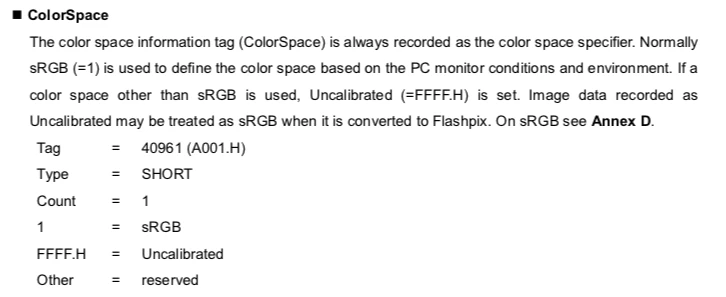
The EXIF 2.31 standard defines only two values for EXIF:ColorSpace, "sRGB" and "Uncalibrated":

When an image is in a color space other than sRGB, then EXIF:ColorSpace should be Uncalibrated. The embedded ICC profile then specifies the color space.

Many cameras have defined additional values for EXIF:ColorSpace, most commonly "Adobe RGB", and many software apps recognize these non-standard values.  See Exiftool's EXIF tags documentation: https://sno.phy.queensu.ca/~phil/exiftool/TagNames/EXIF.html . But LR's encoding strictly conforms with the standard.

3 replies

johnrellis
johnrellisCorrect answer
Legend
May 29, 2019

LR's encoding conforms to the EXIF and ICC standards.  Here's the Exiftool output for Adobe RGB and sRGB TIFFs exported from LR:

$ exiftool -a -G -colorspace -profiledescription *.tif

======== adobergb.tif

[EXIF]          Color Space                     : Uncalibrated

[ICC_Profile]   Profile Description             : Adobe RGB (1998)

======== srgb.tif

[EXIF]          Color Space                     : sRGB

[ICC_Profile]   Profile Description             : sRGB IEC61966-2.1

The EXIF 2.31 standard defines only two values for EXIF:ColorSpace, "sRGB" and "Uncalibrated":

When an image is in a color space other than sRGB, then EXIF:ColorSpace should be Uncalibrated. The embedded ICC profile then specifies the color space.

Many cameras have defined additional values for EXIF:ColorSpace, most commonly "Adobe RGB", and many software apps recognize these non-standard values.  See Exiftool's EXIF tags documentation: https://sno.phy.queensu.ca/~phil/exiftool/TagNames/EXIF.html . But LR's encoding strictly conforms with the standard.

PetrulaAuthor
Inspiring
May 30, 2019

Thank you for the detailed clarification.

So the [ICC_Profile] ProfileDescription is where a software application will find which color space was used.

johnrellis
Legend
May 30, 2019

the [ICC_Profile] ProfileDescription is where a software application will find which color space was used.

More precisely, the entire [ICC_Profile] section, of which ProfileDescription is one field, contains the embedded ICC profile, which specifies the color space.

GoldingD
Legend
May 29, 2019

What version of ACR is your copy of PS using?

(Note, any answer containing the word “latest” will be ignored)

PetrulaAuthor
Inspiring
May 29, 2019

Camera Raw 11.3

Lightroom version 8.3

Ian Lyons
Community Expert
Community Expert
May 29, 2019

I can't replicate your AdobeRGB (1998) issue on either my Mac Pro or MacBook Pro. Is it possible for you to check whether you experience the same issue on another computer?

PetrulaAuthor
Inspiring
May 29, 2019

On a Windows 10 computer, could someone else please export a CR2 file using

Image Format: TIFF

Color Space: AdobeRGB (1998)

Look at the exported TIF file using Windows File Explorer | Properties | Details tab | Color representation

See if "Color representation" says

Color representation: Uncalibrated

Thanks