oliver0541
Inspiring
October 9, 2018
Answered

Export time plus GPS-info as GPS-track ?

  • October 9, 2018
  • 1 reply
  • 600 views

I have a collection of images in my Lightroom catalog, that all have a date/time-stamp and have a geographic location attached. I would like to connect all these locations by a path to show the sequence of the visited places. Is this possilble in Lightroom ? Or is it possible, to export from this collection a GPS-track, that would allow in another tool to draw a path in a map along the locations ?
This topic has been closed for replies.
Correct answer johnrellis

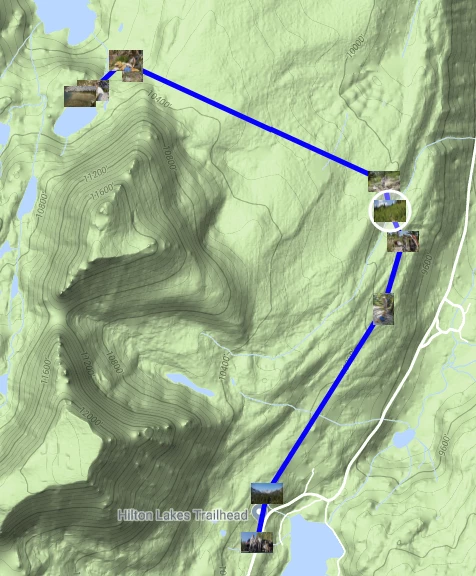
The Geoencoding Support plugin can create a KML file that can be viewed in Google Earth and Google Maps.  It has lots of options: http://regex.info/blog/lightroom-goodies/gps

Jeffrey Friedl's Blog » Jeffrey’s “Geoencoding Support” Plugin for Lightroom

For example:

1 reply

johnrellis
johnrellisCorrect answer
Legend
October 9, 2018

The Geoencoding Support plugin can create a KML file that can be viewed in Google Earth and Google Maps.  It has lots of options: http://regex.info/blog/lightroom-goodies/gps

Jeffrey Friedl's Blog » Jeffrey’s “Geoencoding Support” Plugin for Lightroom

For example:

oliver0541
Inspiring
October 10, 2018

Hi John, after I installed your plugin, I was quite enthousiastic, because that was exactly, what I was looking for, However, from now on I could no longer drag and drop with the mouse in my Windows 10 system (e.g. drag an jpg-image into the Photoshop icon or drop an image in Lightroom onto a specific location in the map module). After I deactivated your plugin, everything is back to normal.

Any idea ?

johnrellis
Legend
October 10, 2018

You might contact the developer via the Web page.  I just skimmed it and didn't see any references to this problem. (It's one of his most popular plugins, so if there was a general problem, it would likely be listed.)  He's usually pretty responsive and provides very good support.