TewRogers
Participating Frequently
September 11, 2025
Answered

Exporting images

  • September 11, 2025
  • 1 reply
  • 2515 views

Hello- I have  the latest vrsion on LRC, never had problems with exporting to a designated folder on my hard-drive  (Windows 11),  seems like that changed today.   My export box opens and when I scroll down it seems to keep trying to save on the CD/DVD option (I don't even have a CD or DVD drive),  I now have to select the Hard-drive option everytime.  Is anyone having the same issue?     Is that a new bug in this app? 


Thanks 


-Terry

Correct answer Per Berntsen

Tried that, sorry but that did not work. 


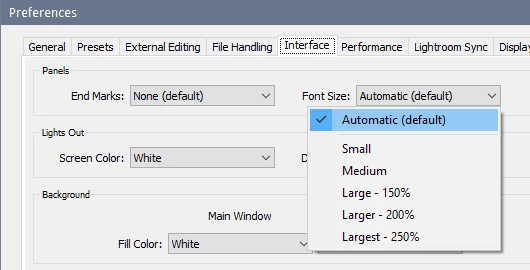
Reducing the font size in LrC (Preferences > Interface) will make the Preferences dialog display smaller.

In any case, you can press Esc for Cancel and Enter for OK as mentioned by @Claire H. 


1 reply

Community Manager
September 11, 2025

Hi @TewRogers, thanks so much for reaching out!

If you haven’t tried it yet, I’d recommend resetting your Lightroom Classic preferences, sometimes internal files can get a bit corrupted and this can help clear things up. Here’s a quick guide on how to do that:
https://adobe.ly/4nkpHJM

Hope that helps!

Alek

*(If you mention me with an @, like @Aleke, I’ll get a notification and can respond faster.)*
TewRogers
TewRogersAuthor
Participating Frequently
September 12, 2025
Thanks for the reply but I had to reinstall and copy the settings from my
other computer. One other thing, I do most of my work on a smaller PC and
the preference box is very large on the machine so I cannot see the save/
ok or cancel button below. Any tips on that?

thanks


*Terry Rogers*
https://www.instagram.com/terryrogersphotos/?__pwa=1

Please be environmentally conscious.