
Ext. drives listed as folders under OS drive (Mac Monterey)
Hi!
Like many other people, I keep my photos on external drives. They have always shown up in Library as separate drives, along with the internal drive that contains the Mac OS, Monterey.
A few minutes ago, I added a new drive, formatted in APFS. Other than the OS drive, it's the first drive I've formatted as APFS.
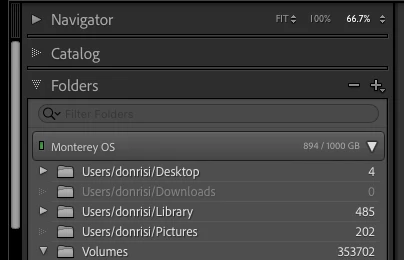
When I relaunched Lightroom, things changed. Now all of my external drives are listed as folders under the main OS drive. Everything is there, and it all works, including the new drive, but I've never seen anything like this before.
I found an article on the Adobe site titled, "Volumes and drives display under / folder," but I don't have a slash as a folder name, only the name of the main OS drive. For that reason, I don't have the "Hide this parent" option they talk about to fix it.
I would really prefer they display as the separate drives they are instead of as folders of the main drive. Restoring a catalog backup didn't change anything.
My main OS drives is named "Monterey OS" and there is not a "/" folder anywhere under that. (See screenshot)
Thanks.


 AdChoices