
Participant
October 19, 2023
Question

External editing does not work in Lightroom Classic

  • October 19, 2023
  • 2 replies
  • 179 views

After updating the Lightroom Classic to version 13.0.1 (updated 2 days ago), the external editor stopped being called (Ctrl E).

Also, in the Preferences section you cannot install Photoshop as an external editor. The corresponding field is gray.
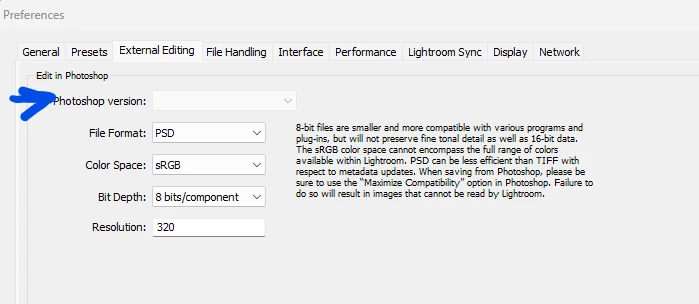
 

Photoshop version 25.0.0 (18 days ago)

Operating System- Win 11

This topic has been closed for replies.

2 replies

JohanElzenga
Community Expert
Community Expert
October 19, 2023

Usually this is solved by uninstalling both Lightroom Classic and Photoshop and then reinstalling Photoshop first and Lightroom Classic second.


-- Johan W. Elzenga
Participant
November 11, 2023

Same problem, but uninstalling both photoshop and lightroom CC as suggested did not work. I am still unable to access Photoshop as an external editor.

jane-e
Community Expert
Community Expert
October 19, 2023

@asado9692071 


I've moved your post from Creative Cloud Desktop to Lightroom Classic for you.


Jane