
Inspiring
January 25, 2025
Answered

External SSD Disconnects and Reconnects

  • January 25, 2025
  • 1 reply
  • 373 views

I have an issue on my MacBook Pro where one of the ports is not as tight as it should be. If the computer or SSD gets moved the drive will disconnect and reconnect as the connection is loose. When it reconnects, it lists as 'Folder 1' or 'SSD Name 1'. Of course this totally messes up my LrC catalog. The only straightforward way I've found to fix this is to restore a backed up Catalog. However, I'm wondering if there is a better way.

Here is a screenshot of my folder structure.
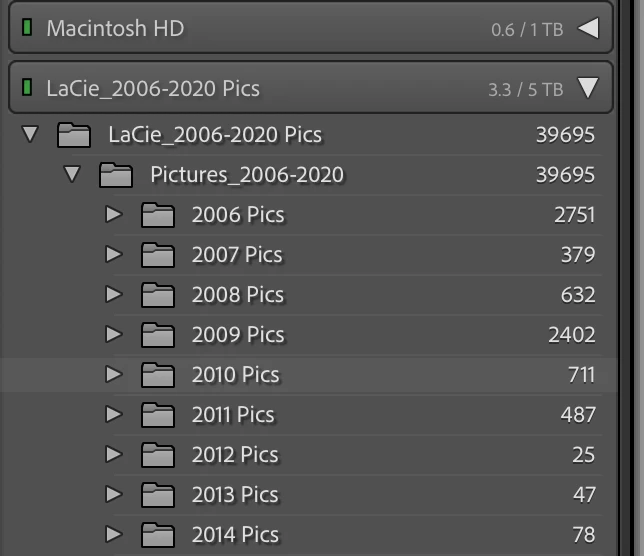


I've been on calls with Adobe Tech Support and they have fixed the problem, but I'd like to understand better how to fix the problem myself.

Thanks,

David


Correct answer dj_paige

The solution to the LrC part of the problem is to go into your operating system and rename the drive so that it is exactly as shown in the Folder Panel. A better solution would be to go to the Apple Store and ask them about replacing this USB port.

1 reply

dj_paige
dj_paigeCorrect answer
Legend
January 25, 2025

The solution to the LrC part of the problem is to go into your operating system and rename the drive so that it is exactly as shown in the Folder Panel. A better solution would be to go to the Apple Store and ask them about replacing this USB port.

DaBrownCOAuthor
Inspiring
January 25, 2025

Thanks. That makes sense as to renaming the drive. On my last call w/Tech Support, we updated the location of each year folder as I recall. Restoring the catalog was easier though since I back up regularly. 

I like the suggestion of fixing the port. This Macbook Pro is an oldy so due to be replaced very soon.