False Mounts
I have been having issues for years regarding "False Mounts" and LightRoom getting confused on the location of my EXT HDD under MacOS. After many support threads and Adobe Remote customer support sessions, I have discovered the issue is due to "False Mounts". It is an issue that affects LightRoom and other Adobe applications because of the way they depend on the Volume structure in locating sources and destinations within the workflow.
I am no expert, but there is no doubt that False Mounts were creating many issues over time that no one seemed to consider. I just wanted to sum up my discoveries as it has been a real sore spot in my workflow.
What are False Mounts?
A False Mount is a folder left on the boot volume, which interferes with the normal moun9ng of external disks and network volumes.False Mounts are typically created
when an applica9on or running process writes data to an external volume after an unexpected unmount. For external drives or network drives, unmounts could be caused by any abrupt disconnec9on of a disk’s connection: a power failure, a computer crash, or a user unexpectedly disconnecting an external drive could all result in a False Mount’s creation.
In my case, I have dedicated drives for Photos, Music, Movies, etc and over time from forced restarts to improper dismounts, I had been collecting quite a few False Mounts.
How do I determine if I have any False Mounts?
In the MacOS Finder, press Shift+Cmd+G (⇧⌘G)
Then type "/Volumes" (without the quotations) into the Go to pane.
Press Return key
Look for folders with names which match an external drive or network volume. Such as if you have an external attached drive entitled LaCie and in the /Volumes list you see:
LaCie
LaCie 1
That LaCie 1 is a false mount (unless you also have a drive named LaCie 1)
In my case you see multiple False Mounts listed in orange highlighter here:
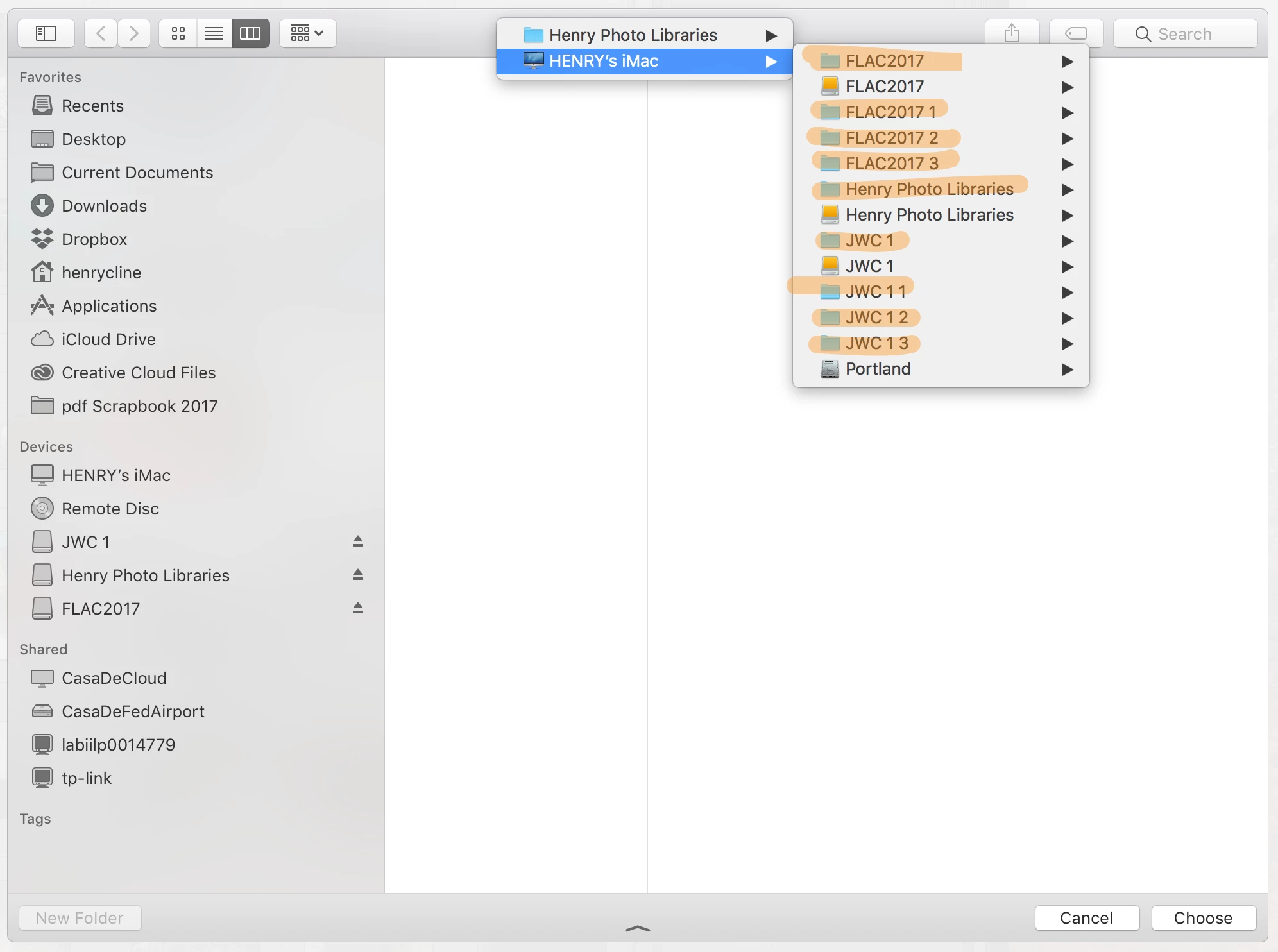
This is my discussion thread here at LR Community before I discovered what False Mounts were.
Ghost devices showing up and confusing LR
How to remove False Mounts
Once you have your /Volumes folder open and indeed have False Mounts, all you have to do is move them to the desktop, look inside to make sure there isnt any data that has been copied to the False Mount, and if it is safe, drag it to the trash and empty the trash.
Other solutions that I have not tried:
Go into MacOS Preferences
Open Sharing,
Click "off" File Sharing and then turn "on" File Sharing.
Command line to remove a false mounted device:
sudo rm -rf Lacie 1
(where Lacie 1 is replaced with the name of your false mount)
Other info on False Mounts
White paper on what they are and how to remove
Issues I have had over the years that are a result of False Mounts
Figuring out importation issues overview
EXT HDD permissions not sticking
 AdChoices