Participant
September 21, 2025
Answered

Falta de espacio Adobe Lightroom Classic

  • September 21, 2025
  • 1 reply
  • 87 views

Hola buenas tardes, 

Publico este post porque estoy empezando a tener problemas a la hora de importar fotos a mi Lightroom Classic. Primero de todo es que es un bloque muy pesado al ser formato RAW para su edición, ergo, más espacio ocupa. 

Este aspecto es el que me preocupa, ya que cada vez que las importo, me coge el disco C: de mi ordenador (la memoria que trae el propio PC) y la verdad que no suelen traer mucha memoria de serie.

Entonces me gustaría consultaros posibles soluciones, o bien alternativas. 

Gracias de antemano.

Correct answer Per Berntsen
quote

Hello, good afternoon 

I'm publishing this post because I'm starting to have trouble importing photos into my Lightroom Classic. First of all, it is a very heavy block as it is RAW format for editing, ergo, it takes up more space. 

This aspect is what worries me, since every time I import them, I get the C: disk of my computer (the memory that comes with the PC itself) and the truth is that they don't usually have much memory as standard.

Then I would like to ask you about possible solutions, or alternatives. 

Thank you in advance.


By @fmrodin91


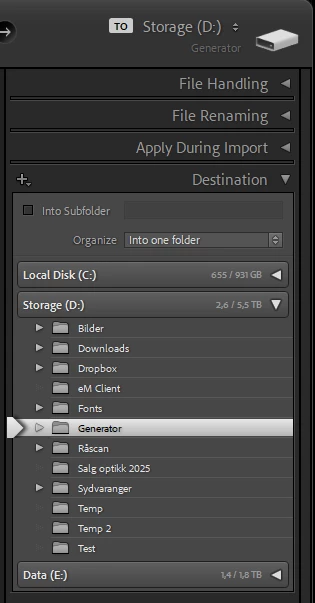
You can choose what disk and folder to import to in the Destination panel on the right hand side of the import dialog.

If you can't see the panel, right click one of the other panel headers (like File Handling) and choose Destination from the list.


1 reply

Per Berntsen
Community Expert
Per BerntsenCommunity ExpertCorrect answer
Community Expert
September 21, 2025
quote

Hello, good afternoon 

I'm publishing this post because I'm starting to have trouble importing photos into my Lightroom Classic. First of all, it is a very heavy block as it is RAW format for editing, ergo, it takes up more space. 

This aspect is what worries me, since every time I import them, I get the C: disk of my computer (the memory that comes with the PC itself) and the truth is that they don't usually have much memory as standard.

Then I would like to ask you about possible solutions, or alternatives. 

Thank you in advance.


By @fmrodin91


You can choose what disk and folder to import to in the Destination panel on the right hand side of the import dialog.

If you can't see the panel, right click one of the other panel headers (like File Handling) and choose Destination from the list.