Known Participant
July 14, 2025
質問

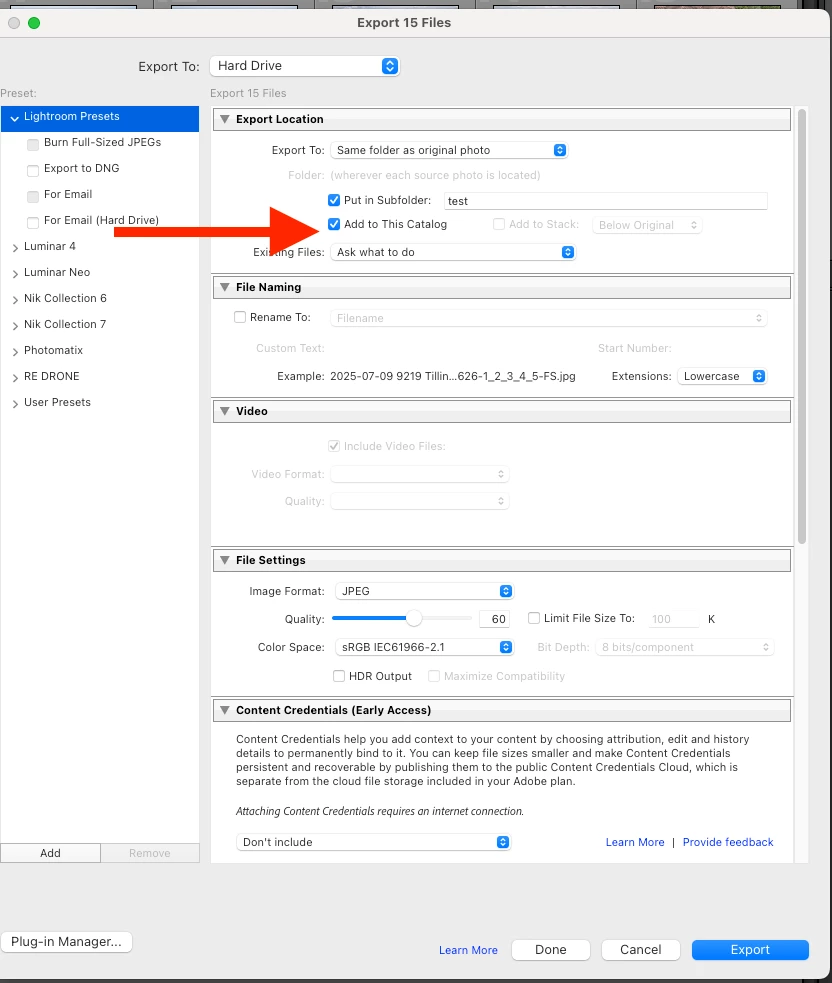
FAST exporting, BUT after the export, the images that are added to the Catalog Makes all slow

  • July 14, 2025
  • 返信数 4.
  • 482 ビュー

This is a former issue. 

As professional photographers we need to create several versions for our images and be able to see them between our catalog. 


The problem is that the export is so fast, but the adding of the now new images is a dread. It makes impossible to operate lightroom until the process is done.  Imagine waiting 3 secs per image after a wedding export with 1000 images.  That's 3000 seconds,  50 MIN...   It brings the whole efficiency to halt. 


please help this a problem that had been reported before but adobe doens't seem to offer a solution. 


返信数 4

Participant
July 16, 2025

Can't export pictures by email


KR Seals
Community Expert
Community Expert
July 16, 2025

@georges66728763  That is is different issue than the one in this thread. I suggest you search this forum for that problem and if you don't find an answer, create a new post with full details including your Operating System (Mac or Windows) and the exact version number of your Lightroom Classic.


Ken Seals - Nikon Z 9, Z 8, 14mm-800mm. Computer Win 11 Pro, I7-14700K, 64GB, RTX3070TI. Travel machine: 2021 MacBook Pro M1 MAX 64GB. All Adobe apps.
Ian Lyons
Community Expert
Community Expert
July 15, 2025

I may be misunderstaning the reason for you creating/exporting/importing multiple versions of each image, but would it not be easier to just use Virtual Copies?

geral42131550作成者
Known Participant
September 28, 2025

Thank you, but that's not the issue. No it doesn't work for us to create virtual copies, when several versions are needed.

For Print publication, web publication, different pixe sizes, with watermark etc etc.  Each folder needs to have the files needed so our team members can access the folders they need.


Community Expert
September 29, 2025

Accepting each folder needs to have the files needed - can the team members not browse to, and carry out needed tasks with, that folder and those files directly? This is AFAICT why we export: to create derived image versions, themselves unsuitable for further editing work or changes of management, that will be accessible from outside the Catalog.


On the subject of fast export but slow re-import: is it possible these exports are merely fast to submit for queued processing? If they are then proceeding in the background, that would result in a delay before each file is made and then a re-import of that becomes possible. So this may accordingly present as fast export but slow import.


The way to be sure would be to separate export and import, and to verify in the file system how long it does take before exported files are completed. Then the import speed could be directly checked also. Also computer resources may be fully taken up with queued export processing, likely more computation-intensive than import would be.

KR Seals
Community Expert
Community Expert
July 15, 2025

I had a chance to do a test to compare my results with yours. My MBP is a M1 MAX 64GB, 2TB SSD. All tests were on the internal drive. I am working with 45MP Nikon Z 8, HE* NEF files that are about 32MB each on the drive. I exported to .jpgs, quality 60, 2500 pixels on the long side. I did the export first, then did a folder sync so I could get separate times for the export and import.

My times were:

250 images

Export - 5 minutes 7 seconds

Import (folder sync) 1 min 0 seconds.

Extrapolated to 1000 images

Export 20 min 28 sec

Import 4 minutes

Please answer my questions in my previous post. If you are using the internal SSD on the MBP, it's probably time for a trip to Apple service.


To export

Ken Seals - Nikon Z 9, Z 8, 14mm-800mm. Computer Win 11 Pro, I7-14700K, 64GB, RTX3070TI. Travel machine: 2021 MacBook Pro M1 MAX 64GB. All Adobe apps.
geral42131550作成者
Known Participant
July 16, 2025

Thank you for testing your exporting times.  My exporting times are not the issue.

The issue is after they are created and exported, the images take too long to be added to the Catalog. Is the adding to the Catalog that takes 2 to 3 sec per image.   

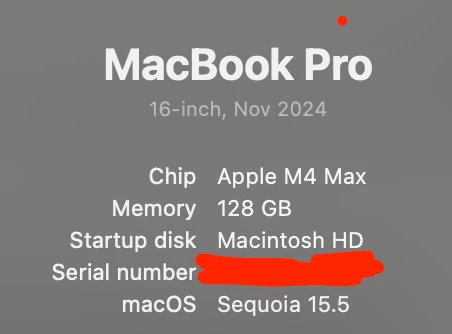
The SDD is the intermal one from the macbook. 

KR Seals
Community Expert
Community Expert
July 16, 2025

Those times don't agree with mine. What size are your exports? How much free space do you have on the internal SSD?

Are you actually saying the 2-3 seconds happens as you scroll through the images that were added after the export?


Ken Seals - Nikon Z 9, Z 8, 14mm-800mm. Computer Win 11 Pro, I7-14700K, 64GB, RTX3070TI. Travel machine: 2021 MacBook Pro M1 MAX 64GB. All Adobe apps.
KR Seals
Community Expert
Community Expert
July 14, 2025

Wnat is your disk configuration? All on internal SSD? External SSD? External HD? NAS? If external, what interface are you using to connect to the disk(s)?

What size files are you working with?

What are your Image Sizing settings in the Export module?


Ken Seals - Nikon Z 9, Z 8, 14mm-800mm. Computer Win 11 Pro, I7-14700K, 64GB, RTX3070TI. Travel machine: 2021 MacBook Pro M1 MAX 64GB. All Adobe apps.