

Fehlermeldung Systemkompatibilität
Liebe Community
ich bekomme seit einiger Zeit bei Öffnen von LR Classic folgende Fehlermeldung. Und leider funktioniert LR auch nicht richtig. ZB friert das Bild ein, ich kann nichts zurücksetzen oder synchronisieren.
Eine Aktualisierung des Treibers ist fehlgeschlagen weil die Komponenten nicht passen.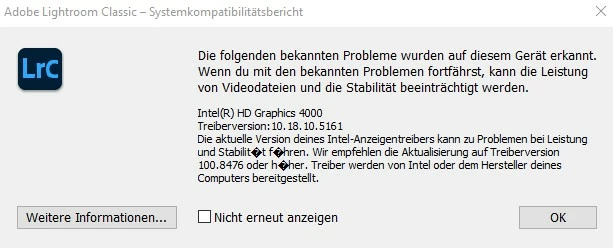
Frage: Lohnt es sich den Laptop aufzurüsten (wäre mir am liebsten, da ich sehr zufrieden bin). Wenn ja, was würde ich denn brauchen?
Wenn nein, irgendwelche Ideen wie ich das Problem lösen kann. Neuer Laptop ist klar, aber aktuell keine 2000 + € übrig 😞
Laptop ist ein ASUS
ASUSTeK COMPUTER INC. K95VBSystemhersteller (System Manufacturer)Systemmodell (System Model)Systemtyp (System Type)Mainboard-Hersteller (Motherboard Manufacturer)Mainboard-Produkt (Motherboard Product)VersionBIOS-Version (BIOS Version)Datum (Date)SMBIOS-Version (SMBIOS Version)Sicherer Start (Secure Boot)
| ASUSTeK COMPUTER INC. |
| K95VB |
| Notebook (Mobile) |
| ASUSTeK COMPUTER INC. |
| K95VB |
| 1.0 |
| 206 |
| 14.06.2013 |
| 2.7 |
| Aus (Off) |
Windows 10
Prozessor (Processor)
Intel® Core™ i5-3230M CPU @ 2.60GHzGerätedetails (Device Details)Hersteller (Manufacturer)Beschreibung (Description)Architektur (Architecture)Anzahl der Kerne (# of Cores)Anzahl der Threads (# of Threads)Grundtaktfrequenz des Prozessors (Processor Base Frequency)Level-2-Cache (Level 2 Cache)Level-3-Cache (Level 3 Cache)Prozessor-ID (Processor Id)Version (Revision)Verfügbarkeit (Availability)
| GenuineIntel |
| Intel64 Family 6 Model 58 Stepping 9 |
| x64 |
| 2 |
| 4 |
| 2601 MHz |
| 512 Kb |
| 3072 Kb |
| 0x306A9 |
| 14857 |
| Betrieb bei voller Leistung (Running at full power) |
Grafikprodukte (Graphics)
NVIDIA GeForce GT 740MGerätedetails (Device Details)Adapterkompatibilität (Adapter Compatibility)Videoprozessor (Video Processor)Anbieter (Provider)VersionDatum (Date)Adapter DAC-Typ (Adapter DAC Type)Verfügbarkeit (Availability)StatusStandort (Location)Gerätekennung (Device Id)Intel® HD Graphics 4000Gerätedetails (Device Details)Adapterkompatibilität (Adapter Compatibility)Videoprozessor (Video Processor)Lösung (Resolution)Bit pro Pixel (Bits Per Pixel)Anzahl Farben (Number of Colors)Aktualisierungsrate – Aktuell (Refresh Rate - Current)Aktualisierungsrate – Maximum (Refresh Rate - Maximum)Aktualisierungsrate – Minimum (Refresh Rate - Minimum)Anbieter (Provider)VersionDatum (Date)Adapter DAC-Typ (Adapter DAC Type)Verfügbarkeit (Availability)StatusStandort (Location)Gerätekennung (Device Id)
| NVIDIA |
| GeForce GT 740M |
| NVIDIA |
| 25.21.14.2531 |
| 04.09.2019 |
| Integrated RAMDAC |
| Offline |
| Dieses Gerät funktioniert einwandfrei. (This device is working properly.) |
| PCI bus 1, device 0, function 0 |
| PCI\VEN_10DE&DEV_1292&SUBSYS_10CC1043&REV_A1\4&29020321&0&0008 |
| Intel Corporation |
| Intel® HD Graphics Family |
| 1920 x 1080 |
| 32 |
| 4294967296 |
| 59 Hz |
| 59 Hz |
| 59 Hz |
| Intel Corporation |
| 10.18.10.5161 |
| 08.06.2020 |
| Internal |
| Betrieb bei voller Leistung (Running at full power) |
| Dieses Gerät funktioniert einwandfrei. (This device is working properly.) |
| PCI bus 0, device 2, function 0 |
| PCI\VEN_8086&DEV_0166&SUBSYS_10CC1043&REV_09\3&11583659&0&10 |
 AdChoices