edgark21724952
Inspiring
November 10, 2021
Answered

Fehlklick in der Stichwortliste rückgängig machen

  • November 10, 2021
  • 1 reply
  • 228 views

Meine Stichwortliste ist hierarchiv aufgebaut. Manchmal kommt es vor, dass ich einen Klick in das falsche Feld mache und so die Anzahl des falschen Objektes um "1" erhöhe.

Beispiel: Durch einen Fehlklick wird die Anzahl der Fotos von "Tanta Erna" auf "20" erhöht, obwohl nur "19" Fotos der Dame vorhanden sind.

Wie kann ich diesen Fehlklick rückgängig machen?
This topic has been closed for replies.
Correct answer Rob_Cullen

A wrong keyword on an image-

If you do immediately after adding the keyword by a wrong click- [Ctrl+Z] 'undo' can reverse the keyword add.


If, in the Grid View, you select only the image "wrong object" you can-

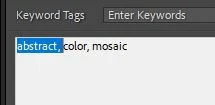
1) Highlight and [Delete] the keyword in the Keywording panel-

example to [Delete] "abstract" from one image.

or

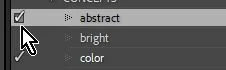
2) In the Keyword List panel-  Click on the box with the check mark next to the wrong Keyword. This will remove this keyword from the selected image/s.

example Click on the check box to remove "abstract" from selected image.


1 reply

Rob_Cullen
Community Expert
Rob_CullenCommunity ExpertCorrect answer
Community Expert
November 11, 2021

A wrong keyword on an image-

If you do immediately after adding the keyword by a wrong click- [Ctrl+Z] 'undo' can reverse the keyword add.


If, in the Grid View, you select only the image "wrong object" you can-

1) Highlight and [Delete] the keyword in the Keywording panel-

example to [Delete] "abstract" from one image.

or

2) In the Keyword List panel-  Click on the box with the check mark next to the wrong Keyword. This will remove this keyword from the selected image/s.

example Click on the check box to remove "abstract" from selected image.


Regards. My System: Windows-11, Lightroom-Classic 15.0, Photoshop 27.0, ACR 18.0, Lightroom 9.0, Lr-iOS 10.4.0, Bridge 16.0 .
edgark21724952
Inspiring
May 26, 2022

Danke für die Tipps. Werde ich gleich ausürbieren.