


Inspiring
May 26, 2025
Answered

File is in Catalog twice - how to get rid of "missing" version?

  • May 26, 2025
  • 2 replies
  • 399 views

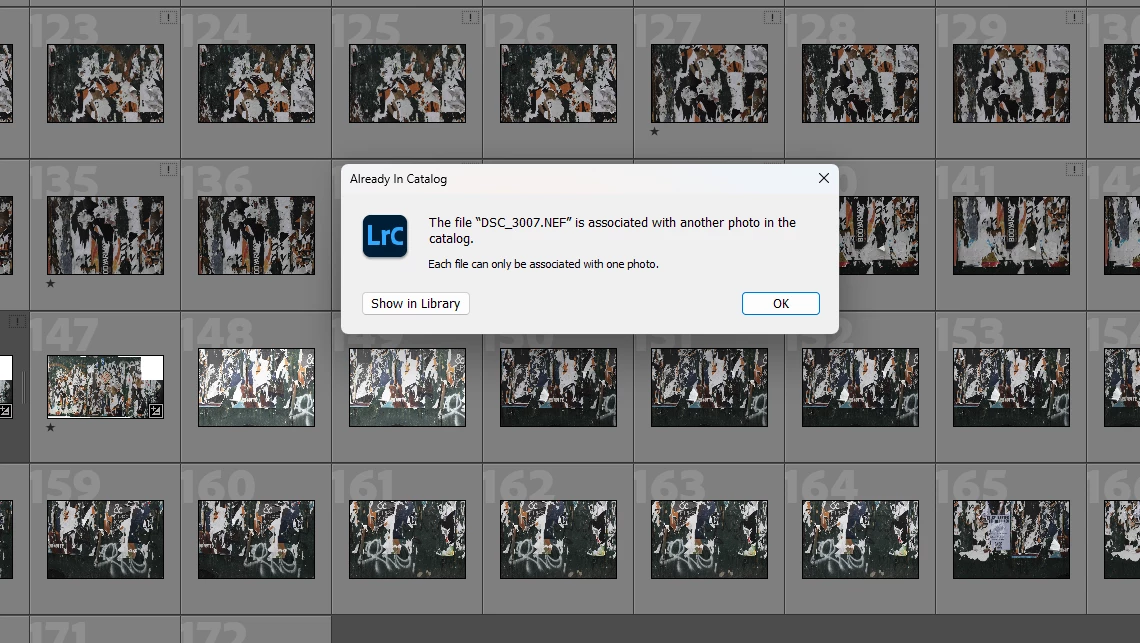
I'm not sure what happened here, but I have a collection that has the same photos in it twice - but for each pair, one of them is "missing."  I was going to find the missing photo by navigating to it in File Explorer, but doing so produced the error message shown below.  I want to get rid of the missing photo for each pair.  Can I do that in an automated fashion somehow?  Many thanks.  


Correct answer JohanElzenga

Lightroom can't delete missing photos from disk, because it doesn't know where these photos are. The only option therefore is to remove them from the catalog.


2 replies

dj_paige
Legend
May 26, 2025

You have imported a photo (or possibly a whole folder) more than once. And one of these duplicates seems to be missing (they have the exclamation point icon). So, select the photos that you want to delete, click on all Photographs (they will remain selected), and then delete them from Lightroom (but not from the hard disk).


Or if it is a whole folder that has imported twice ... right-click on a missing and select "Go to Folder in Library", the selected folder will then be highlighted in the folder panel (you may have to scroll up or down to find the highlighted folder, and it may be on a different drive than most of your photos) and then delete that folder.


CAUTION: make sure you have recent backups of your catalog file and recent backups of all your pohtos before doing this (you should be doing that anyway). CAUTION #2: make sure the missing one is the one you really want to delete, it may be that the missing has edits and/or user-supplied metadata, while the non-missing one does not have your edits and/or user-supplied metadata, in which case you may want to keep the missing one and delete (from Lightroom only, not from the hard disk)

Inspiring
May 26, 2025

Thanks.  I right-clicked on the missing photos, then clicked on All Photrographs, the selected photogrpahs are still selected.  Then I right-clicked on one of the the photographs and got this dialog box.  Do I now just select Remove Photos?  I don't see an option to Delete photos, with the added option to do so from LR or the Disk.  Thanks.  


JohanElzenga
Community Expert
JohanElzengaCommunity ExpertCorrect answer
Community Expert
May 26, 2025

Lightroom can't delete missing photos from disk, because it doesn't know where these photos are. The only option therefore is to remove them from the catalog.


-- Johan W. Elzenga
JohanElzenga
Community Expert
Community Expert
May 26, 2025

Lightroom Classic has a menu to find all missing images: File - Find All Missing Photos. This will create a special collection with all these photos, so you can select them all and then remove them from the catalog.


-- Johan W. Elzenga
