All Smart Previews for a particular catalog are in a file in that catalog’s folder; the file is named
"…Smart Previews.lrdata"
As the others are saying, the question is which images have Smart Previews in that file, and they usually don’t get them automatically. I think the only way they would have them automatically is if Build Smart Previews is enabled in the Import dialog box, but that option doesn’t apply to images imported by syncing down from a mobile device through the Lightroom cloud as you are doing.
If you want to know specifically which images do have Smart Previews, you can tell by looking at an image in the Develop module, or you can generate a list using a Smart Collection.
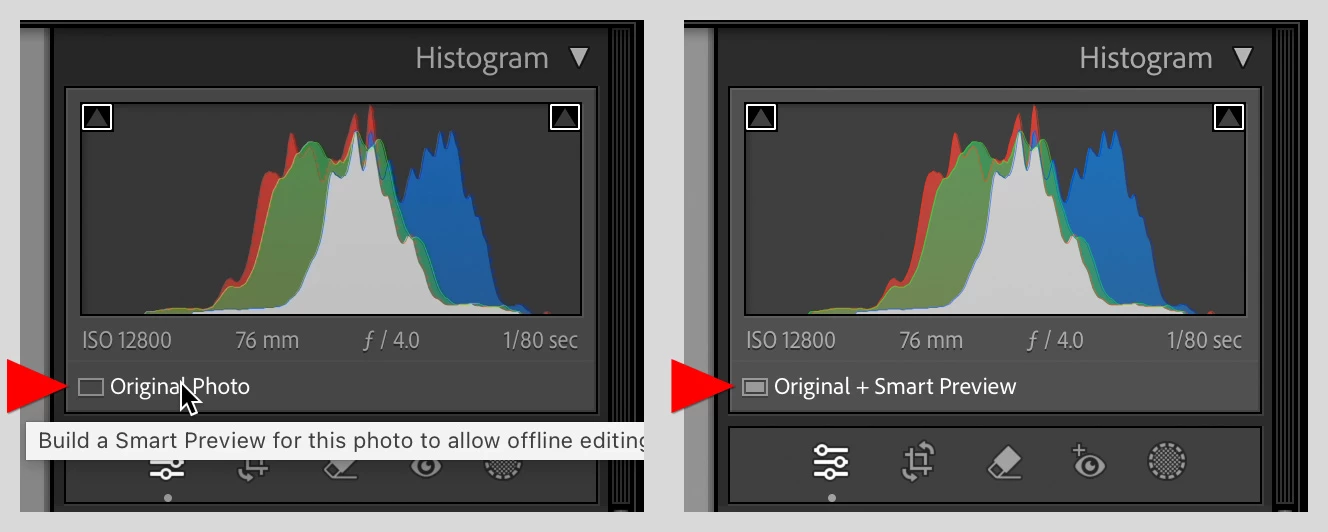
In the Develop module, the Smart Preview indicator is under the histogram as shown in the picture below. If it only says Original Photo, there is no Smart Preview, but you can generate one by clicking that indicator. The picture shows before (left) and after (right) generating a Smart Preview.
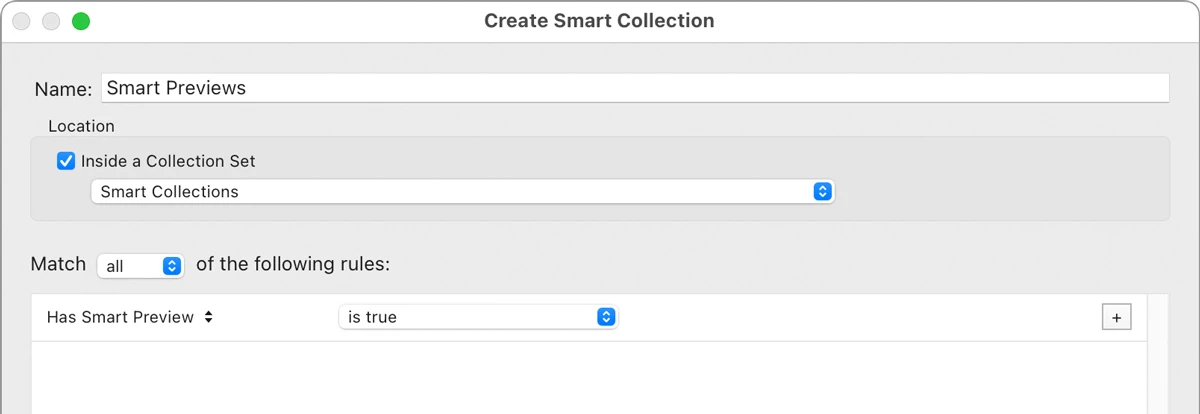
If you want a list of which images in the catalog have Smart Previews, you can set up a Smart Collection as shown in the picture below.
If you want to generate Smart Previews in bulk, select them and use the command that JohanElzenga already mentioned.




 AdChoices