
Participant
December 27, 2021
Question

File numbers switched on Import

  • December 27, 2021
  • 2 replies
  • 917 views

I import Sony raw files .ARW into LR Classic (v11) and rename, adding a prefix (happens with both the COPY as DNG *and* the COPY function). This has always worked seemlessly until v11 

Now, the original file number on the memory card is switched with other photos being imported. This seems to be a random reassignment of the file numbers to imported files.

e.g. PKR04938.ARW  becomes PKR211225_014941  while the file PKR04941 becomes PKR211225_014937. So it's not just switching a single pair of file numbers.
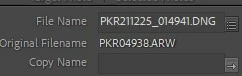
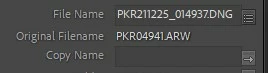
The same thing happens when I just use the COPY function on import - without converting to DNG. 


Dell desktop 8930, Windows 10, 64-bit.


This topic has been closed for replies.

2 replies

ManiacJoe
Inspiring
January 28, 2022

Check the template for the fields you are using. If the text box contains any "sequence" field, this is an internal counter. If you want the original file number, you need a "original number" or "file number suffix" field, probably in the "filename" group.


pkpkotoAuthor
Participant
February 3, 2022

Yeah, thanks. I'm aware of that. This bug is actually switching the original file numbers between pairs of files as they are renamed. 

Community Expert
February 3, 2022

The template you screenshot above uses the sequence keyword. That will randomly flip fom the original order as imports are done multithreaded meaning more than one image is imported at a time and you can randomly flip sequence numbers this way from what you would expect looking at the alphabetical order. Use the "original number" or "file number suffix" as @ManiacJoe suggests.

johnrellis
Legend
December 30, 2021

Please post a screenshot of the file renaming template you're using for import.

pkpkotoAuthor
Participant
January 27, 2022

Hey, sorry for taking so long to post this, but the problem tapered off, and then with a adobe rep on the chat line, it completely dissappeared once (after setting GPU accelerator to AUTO). I just tried a IMPORT of 200+ images and the same problem there still. Even if I don't do the DNG convert, it still does it. So.... here's the rename template I use:


ALSO, not only does the renamimg get messed up. the whole import process from the start is slower than ever and produces the white screen "The process is not responding..." dialog several times.  I've tried changing cache to 16 Gb, turning this and that off, etc. Turning GPU accelerator to AUTO seemed to help when the Adobe rep was on the chat, but it's behaving the same way now, even though GPU is still on Auto.  I managed to do the IMPORT by skipping the rename template, and just importing and copying to DNG. I renamed after the import was done.