Inspiring
July 17, 2018
Answered

Filename Template Editor question; multiple photos in same second

  • July 17, 2018
  • 1 reply
  • 324 views

I just moved to a new computer and didn't save my import preset for renaming my photos file names. I have reconstructed it but have one minor problem. Here is my file naming convention:

JAH-YYYYMMDD-HHMMSS-X

The problem is, I want the "X" to be a sequential number for photos that were taken in the same second. For example, If I took a burst of photos at 223515 (UTC), they would be tagged ...223515-1, ...223515-2, ...223515-3,

I know I did this before. I tried sequence as the token, but it just tagged all my photos I imported as 1 through X, even though none were take within the same second.

Any help would be appreciated.

Thaniks,

Jim
    This topic has been closed for replies.
    Correct answer Bob Somrak

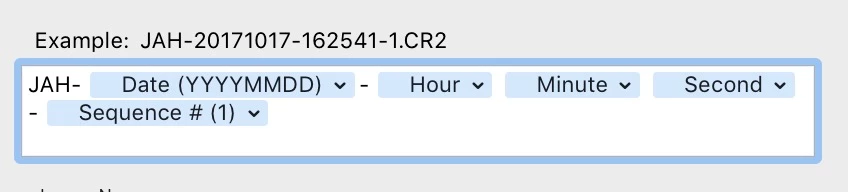
    This sort of does what you want but I don't know how you guarantee that the second doesn't increment if the sequence of photos rolled over to the next second.  In fact if you were a second away from the top of the hour the hour, minute and second could be different. 

    1 reply

    Bob Somrak
    Bob SomrakCorrect answer
    Legend
    July 17, 2018

    This sort of does what you want but I don't know how you guarantee that the second doesn't increment if the sequence of photos rolled over to the next second.  In fact if you were a second away from the top of the hour the hour, minute and second could be different. 

    M4 Pro Mac Mini. 48GB