
Inspiring
July 9, 2026
Question

Filmstrip data has changed

  • July 9, 2026
  • 2 replies
  • 33 views

For as long as I can remember, hovering over an image on the filmstrip gave a popup that read file name, date & time, and resolution. Now it is reading file name and exposure data. This is only happening on one of my computers so it must be a setting but I can’t find it. Thanks in advance.
    2 replies

    gary_sc
    Community Expert
    Community Expert
    July 9, 2026

    Hi, ​@pkk3, The trickyist part of this is that if you go to where you think the solution is (Settings/Preferences), you will not find the solution.

    The trick is to go to the Edit menu, and scroll woay down to Loupe Info. See if the Check Marks match mine. That’s what you want. For more references, go to Library mode, and click on the Loop view (Not the Grid view). You will see Info 1 and/or Info 2 in the upper right hand corner, depending on your settings here. This will also be what you see when you hover over an image in the filmstrip.

    Let us know if this solves your problem. 

    As to why it stopped showing, there’s no way to know that.


    Rob_Cullen
    Community Expert
    Community Expert
    July 9, 2026

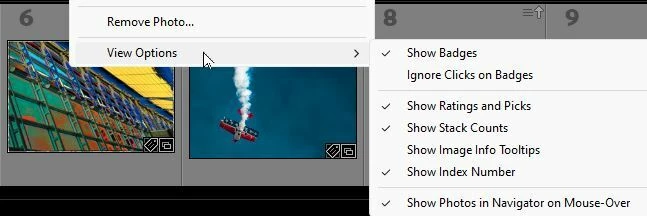
    [Show Image info tooltips] needs to be checked on in the View options for the film strip. Do a [Right-Click] on a filmstrip image to open the context menu for ‘View Options’-  Also if the Filmstrip is markedly reduced in size then badges, flags, etc will not show on the filmstrip. 


    Regards. My System: Windows-11, Lightroom-Classic 15.4.1, Photoshop 27.8, ACR 18.4, Lightroom 9.4, Lr-iOS 10.4.0, Bridge 16.0.3 .
    pkk3Author
    Inspiring
    July 9, 2026

    Yes that fixed it. I should have consulted the forum sooner. Thanks again.