
Answered
Filter by Keyword in Lightroom
Is there a way I can filter photos by keyword in lightroom and see all photos (regardless of folder or project) associated with a particular keyword?
Thanks!
Is there a way I can filter photos by keyword in lightroom and see all photos (regardless of folder or project) associated with a particular keyword?
Thanks!
Here are two ideas- (there are more!)
1. open the [Keyword List] panel and click on the white arrow at the end of a keyword. (you may need to expand hierarchy 'folders')
And you can type in the Keyword search field to narrow the keyword list to specific keywords.
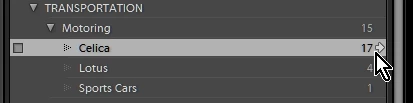
2. Select "All Photographs" in the Catalog Panel (under Navigator)
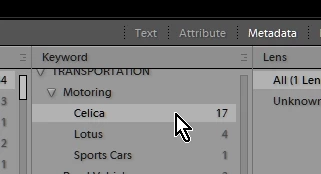
Click on the "Metadata" filter and set one of the columns to "Keyword". (any other columns may need to be set to "All (... )" ), Click on a keyword for photos using that keyword. Hold down CTRL to select multiple keywords (eg. show both Celica AND Lotus)
or-
3. Use the Filter Bar "Text"

Already have an account? Login
Enter your E-mail address. We'll send you an e-mail with instructions to reset your password.
 AdChoices