Inspiring
July 14, 2021
Answered

Filtering on the Stars attribute doesn't return any photos - "USED PHOTOS"

  • July 14, 2021
  • 6 replies
  • 1209 views

Hi all,  Can anyone help?


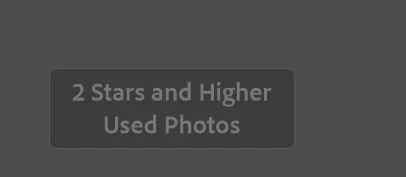
When I filter on Star Ratings within a collection Lightroom CC Classic doesn't return any photos.  It says its adding a filter for "USED PHOTOS". but the same search in "ALL Photographs" the search works correctly.  
I can't find "USED PHOTOS" anywhere in the help.  What does this mean and how can I just filter on start ratings?
 

Thanks

This topic has been closed for replies.
Correct answer JohnFe

Hi, I think I have solved it.  

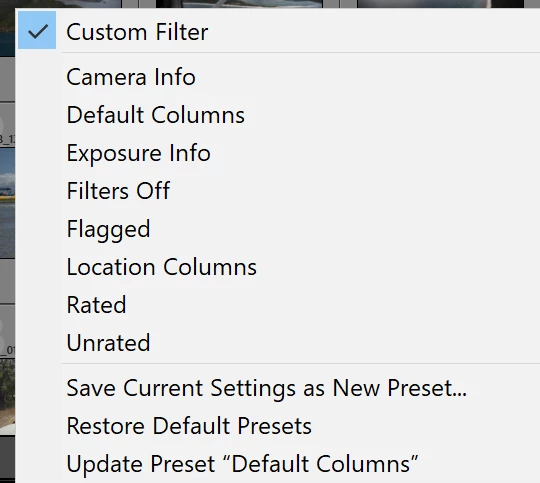
 I changed "Custom Filter" to "Rated" and it works.  Now when I turn off filter 


and then filter by Start rating it works.  I had previously "Restore Filter Preset" but it must not reset the custom filter.    Interestinly when I filter by Star Rating (bt clicking on the Stars" if changes the filter to Custom Filter 


 I have no idea how or when the custom filter got "corrupted" but possibly last time I used the Book module??


Thanks for your help.  Much appreciated.


6 replies

GoldingD
Legend
July 15, 2021

My bad, incorrect reply, Deleated


GoldingD
Legend
July 15, 2021

Ah, in that screen shot included in your not in book reply, Upper shot, in the lower area, the White Flag, as in Flagged Photos. And it does not appear any of them are flagged.

For those not seeing that icon in the toolbar, over on the right, Select Toolbar Content. (not a default apparently)


JohnFeAuthorCorrect answer
Inspiring
July 15, 2021

Hi, I think I have solved it.  

 I changed "Custom Filter" to "Rated" and it works.  Now when I turn off filter 


and then filter by Start rating it works.  I had previously "Restore Filter Preset" but it must not reset the custom filter.    Interestinly when I filter by Star Rating (bt clicking on the Stars" if changes the filter to Custom Filter 


 I have no idea how or when the custom filter got "corrupted" but possibly last time I used the Book module??


Thanks for your help.  Much appreciated.


GoldingD
Legend
July 15, 2021

In the Library menu bar, disable filters, then enable. 

GoldingD
Legend
July 14, 2021
Lightroom CC Classic

As Adobe no longer calls the various Lightroom centric programs Lightroom CC any longer, can I ask you to clarify what Lightroom program and version you are using?


JohnFeAuthor
Inspiring
July 14, 2021


Although the issue also occurred rior to the latest update.

Sean McCormack
Community Expert
Community Expert
July 14, 2021

I'd also set Filters to none in the Filter bar, or use Filters in the Filmstrip set to Filters Off, and then select the star rating I wanted. 

Sean McCormack. Author of 'Essential Development 3'. Magazine Writer. Former Official Fuji X-Photographer.
JohnFeAuthor
Inspiring
July 14, 2021

Thanks Sean, yes I'm in the Library module.   I've tried setting the filter to None and the on either the filmstrip filter bar or the one at the top of the Grid.  Same issue.  It seems to be related to the "Used Photos".


Sean McCormack
Community Expert
Community Expert
July 14, 2021

I've gone through a whole series of articles trying to find a reference to Used Photos and can't find a mention of it either.  I use collections and filters extensively and haven't seen it before.


I asked about the collections because you can have Selected Photos as an option in some Modules. 

Sean McCormack. Author of 'Essential Development 3'. Magazine Writer. Former Official Fuji X-Photographer.
Sean McCormack
Community Expert
Community Expert
July 14, 2021

Collections are throughtout all Modules, so can I check if you're in Library? 

Sean McCormack. Author of 'Essential Development 3'. Magazine Writer. Former Official Fuji X-Photographer.