[This post contains embedded images that don't appear in email. View the post in your Web browser to see the images.]
"I have RAW files in one folder and JPEG files in a different folder - these are exported photos with the same name as their RAW versions. I want to keep ONLY those RAW files that were exported as JPEG. How can I only select those RAW files that match the name of the exported JPEGs?"
A couple options, one manual and one automated:
- Manual method (assuming the JPEGs have been imported into the catalog): In View > View Options > Grid View, ensure that File Name is included in Cell Extras (i.e. that it will show next to the thumbnails in grid view). In the Folders panel, select the folder containing the raws. Select all the raws' thumbnails and set their color label to red. Now Cmd/Ctrl-click the folder containing the JPEGs, so that both folders are selected. Do View > Sort > File Name. Visually scan the thumbnails looking for a pair, the first one with a red label (a raw), the second with no red label (a JPEG), and the file names matching. Remove the red label from each such raw. When you're done, filter the raw folder for just those that are labeled red.
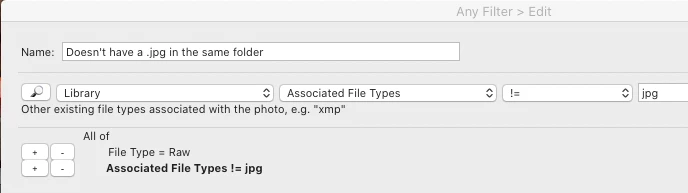
- If the JPEGs have been imported into the catalog, then in LR move all of them from their current folder into the folder containing the raws. If the JPEGs haven't been imported into the catalog, then use Finder / File Explorer to move them into the raws' folder. Then use the Any Filter plugin to search that folder using this query:
[Use the blue reply button under the first post to ensure replies sort properly.]




 AdChoices