Inspiring
October 12, 2021
Question

Finder not finding.

  • October 12, 2021
  • 4 replies
  • 195 views

Having issues with Finder not talking to LRC. 


Two related situations. Firstly, Finder will not delete photos unless they are explicity marked for deletion with "delete rejected photos". I've tracked this in the finder and its consistent. LRC will delete them from the catalogue, but will not delete them from the disk if I use other methods ( like the delete button, or variations of ) Even if the "delete from disk" dialogie comes up - it doesn't.


Second, and more concerning is Finder is not tracking movement of photos from folder to folder. For example, I can move photos from Folder A to Folder B, and finder will not update. When I go back into LRC and try to Synch Folder A, the files are still there. 


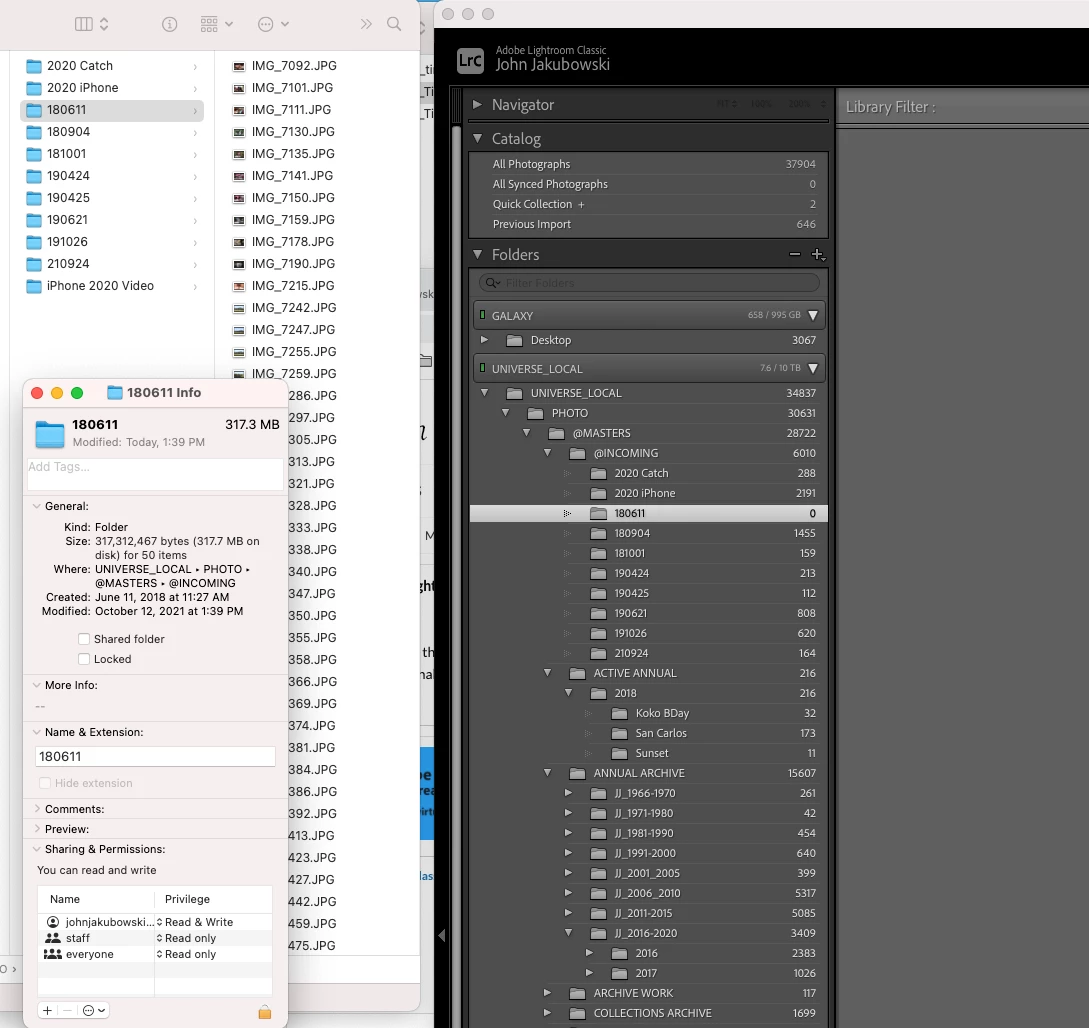
Heres a screenshot for visuals.
I go through and move the photos from folder 180611 until they are ALL in other folders. I am moving them through drag and drop in LRC. Finder doesn't register the move. I restart finder, and a portion ( not all ) are still there. If I try to synchronize the folder through LRC, that same portion show up. I restart my entire system and the raminder photos are still there in the folder.


Am I missing something crucial to how LRC works ? 


This topic has been closed for replies.

4 replies

GoldingD
Legend
October 14, 2021
For example, I can move photos from Folder A to Folder B, and finder will not update. When I go back into LRC and try to Synch Folder A, the files are still there. 

Likely the previews still exist. The photos went missing, and LrC will not know where they went.


http://www.computer-darkroom.com/lr2_find_folder/find-folder.htm


GoldingD
Legend
October 14, 2021

First off, do not delete, move, or rename photos outside of LrC.

Second off, no, Finder does not communicate to LrC

(LrC, does however, communicate to the file management in MACOS, not the other way around)

Third, the Folders panel in LrC us not a actual file manager.


Moving on


Two related situations. Firstly, Finder will not delete photos unless they are explicity marked for deletion with "delete rejected photos". I've tracked this in the finder and its consistent. LRC will delete them from the catalogue, but will not delete them from the disk if I use other methods ( like the delete button, or variations of ) Even if the "delete from disk" dialogie comes up - it doesn't.


When you delete the photo in LrC, actually choose to delete, not just remove, does Finder show the photo in the trash bin?


Note, close LrC before checking, Until LrC is closed then restarted it may still make the OS think it has the photo file in use.


Note, do not have Finder open while using LrC in this case. You may have to close Finder, then restart Finder to get around a MACOS quirk, so why not have it closed.


TheDigitalDog
Inspiring
October 14, 2021

This is really simple: DO NOTHING in the Finder that you can do in LR! 

When you do anything outside LR, how can it 'know' what you did behind it's back? It can't. 

Anything you need to do in LR that can also be done in the Finder can be done there and LR now knows what you did. Move, rename, delete, make a folder etc; all doable inside of LR. Do it there, LR will understand what you did. 

Do it in the Finder, nope. 

Author “Color Management for Photographers" & "Photoshop CC Color Management/pluralsight"
kentdesign
Community Expert
Community Expert
October 14, 2021

Not sure I totally understand your question. However, you should not be moving anything with the finder.

Open Lightroom Classic and have it Import photos or catalogs,

Lightroom is the central hub of sorts through which you should work.

Whenyou move items using the finder, LRC has no idea what you are doing and the SYNC button is not for that purpose.

please check out the Lightroom Queen's suggestions here:

Merging Catalogs - The Overview | The Lightroom Queen